

Salesforce to automated lead qualification: complete 2026 workflow
Salesforce AI lead qualification works best with evidence and human review. Configure triggers, validation, routing, and controls before expanding scope.

Instead of manually reviewing every Salesforce lead, configure Salesforce AI lead qualification to assess fit, record supporting evidence, and route uncertain cases to a person. This 2026 workflow connects a Salesforce record trigger to an approved qualification service, then writes the decision back without giving the model control over ownership or lifecycle changes.
- Salesforce AI lead qualification needs explicit fit criteria, evidence, and a human-review route—not just a score.
- National AI Consultants suits established businesses seeking an accountable AI department, starting with an AI Opportunity Assessment.
- Use Salesforce Flow for orchestration; keep qualification logic and routing permissions separate.
- Requalify changed leads only when relevant inputs change, and preserve the previous decision.
Why this matters
A faster qualification process is useful only when sales trusts the result. An unexplained score moves the argument from the inbox into Salesforce; it does not settle who deserves attention.
National AI Consultants is suited to established businesses that need an accountable AI department, not another standalone qualification tool. Its delivery model includes implementation, ongoing management over the client relationship, and internal team training.
For businesses with $10M+ in annual revenue, start with an AI Opportunity Assessment rather than assuming a build is justified. The National AI Consultants approach puts the operating decision first: identify the bottleneck, establish ownership, and decide whether implementation belongs on the roadmap.
Your 2026 design should distinguish qualification from prediction. Qualification applies your acceptance criteria to available evidence; predicting a sale is a different task. Do not present an AI-generated fit judgment as a validated probability of revenue.
Before you start
- Salesforce access: Have an administrator who can configure Lead fields, build flows, and review integration permissions. Use a sandbox and representative test records before changing production behavior.
- An approved qualification service: Confirm the model connection, authentication, permitted data, and callable integration action. Salesforce Flow orchestrates the process; this guide does not assume your organization already has a native AI action or the necessary entitlement.
- A signed-off decision policy: Bring acceptance criteria, disqualifying conditions, an escalation owner, and examples. The non-obvious gotcha is repeated execution: writing the result back to a Lead can retrigger automation unless entry conditions exclude those output changes.
Assign one business owner before configuration begins. Sales operations owns acceptance rules; the administrator owns Salesforce behavior; the integration owner owns the model connection and failure handling. One person can hold multiple responsibilities, but none should remain implicit.
1. Qualification policy
Define the decision before configuring the trigger. Otherwise, automation reproduces conflicting sales judgments at greater speed.
- Document the minimum evidence needed to assess a lead. Separate customer-fit criteria from contactability and from expressed buying intent; an email address alone does not establish fit.
- Define three decision categories: Qualified, Not qualified, and Needs review. These are proposed business values, not built-in Salesforce qualification statuses.
- Create custom Lead fields for the qualification decision, explanation, evidence references, processing state, policy version, and evaluated-input fingerprint. A fingerprint is a repeatable identifier for the information evaluated; it helps detect unchanged inputs.
- Define which conditions require human review. Missing essential information, contradictory evidence, and unsupported claims should not silently become rejection reasons.
- Name the person or queue responsible for reviewing exceptions, and document how a reviewer records an override.
Keep proposed custom fields separate from existing lifecycle fields until the mapping is approved. For example, do not treat a generated qualification decision as permission to convert a Lead or overwrite a sales representative's assessment.
Write the policy in observable terms. “A good company” is not an instruction; “matches the approved customer profile based on the supplied company information” is a rule whose evidence a reviewer can inspect. If your team cannot consistently apply a criterion manually, resolve that disagreement before automating it.
Expected result: You have an approved decision contract, proposed output fields, and an owner for exceptions. A reviewer can explain why a lead belongs in each category without consulting the model.
2. Salesforce record trigger
Use a creation-only trigger for the initial workflow. It gives you a narrower starting scope than evaluating every edit to every existing Lead.
- In Salesforce Setup, search for Flows, open Flows, and select New Flow.
- Select Record-Triggered Flow. Choose Lead as the object and A record is created as the trigger condition.
- Configure entry conditions using your actual custom fields. Require the approved minimum input and exclude records already marked for processing or completed evaluation.
- Under Optimize the Flow for, select Actions and Related Records. This is an after-save workflow, appropriate for subsequent actions and related processing rather than merely setting values before the original save.
- Save the flow with a name that identifies the object and purpose. Keep it inactive while you configure the qualification action and test the complete path.
An external model call needs a supported callout pattern. Have the administrator and integration owner select an asynchronous path or another approved asynchronous integration design before connecting it. Do not place an unverified external call into the immediate record-save path.
Expected result: Creating an eligible test Lead starts the intended processing path. Creating an ineligible Lead does not request qualification, and the flow remains inactive in production until end-to-end acceptance is complete.
Boundary checks before connection
Review other Lead automation before adding routing behavior. Existing assignment rules, flows, and integrations can modify the same record; document which process has authority over each field.
Also decide what happens when a Lead is converted while qualification is still processing. The result handler should recheck record eligibility before writing a delayed response. A valid response is not permission to update a record whose business state has changed.
3. Qualification action
The qualification service should return a structured decision, not unrestricted prose. Salesforce can then validate the response before acting on it.
- Build the request from approved Lead fields and authorized enrichment sources. Send only information needed for the decision; exclude unrelated notes and sensitive content unless explicitly approved.
- Include the policy version and input fingerprint with the request. Keep a request identifier so the response can be connected to the correct evaluation.
- Specify required response elements: decision category, explanation, evidence references, and missing information. Require the service to distinguish supplied facts from unresolved questions.
- Add the configured integration through the supported Flow mechanism. Where the administrator has exposed it as an action, use Action and select its actual configured label; there is no universal action name for this custom connection.
- Validate the response against the approved categories and required fields. Send malformed responses, absent evidence, and integration failures to a controlled exception path.
- Store the validated result in the proposed custom fields. Keep raw diagnostic content out of ordinary sales-facing fields when it contains unnecessary data.
Treat lead-submitted text as evidence, not instructions. A message telling the system to ignore qualification rules must not change the policy, reveal internal criteria, or authorize an unrelated action.
Expected result: Each successful request produces a valid decision with an inspectable reason. Failed requests remain visible as processing failures rather than appearing as unqualified leads.
The processing sequence is Request, Validate, Record, and Route. Validation sits before the business action so an unexpected model response cannot directly determine ownership or rejection.
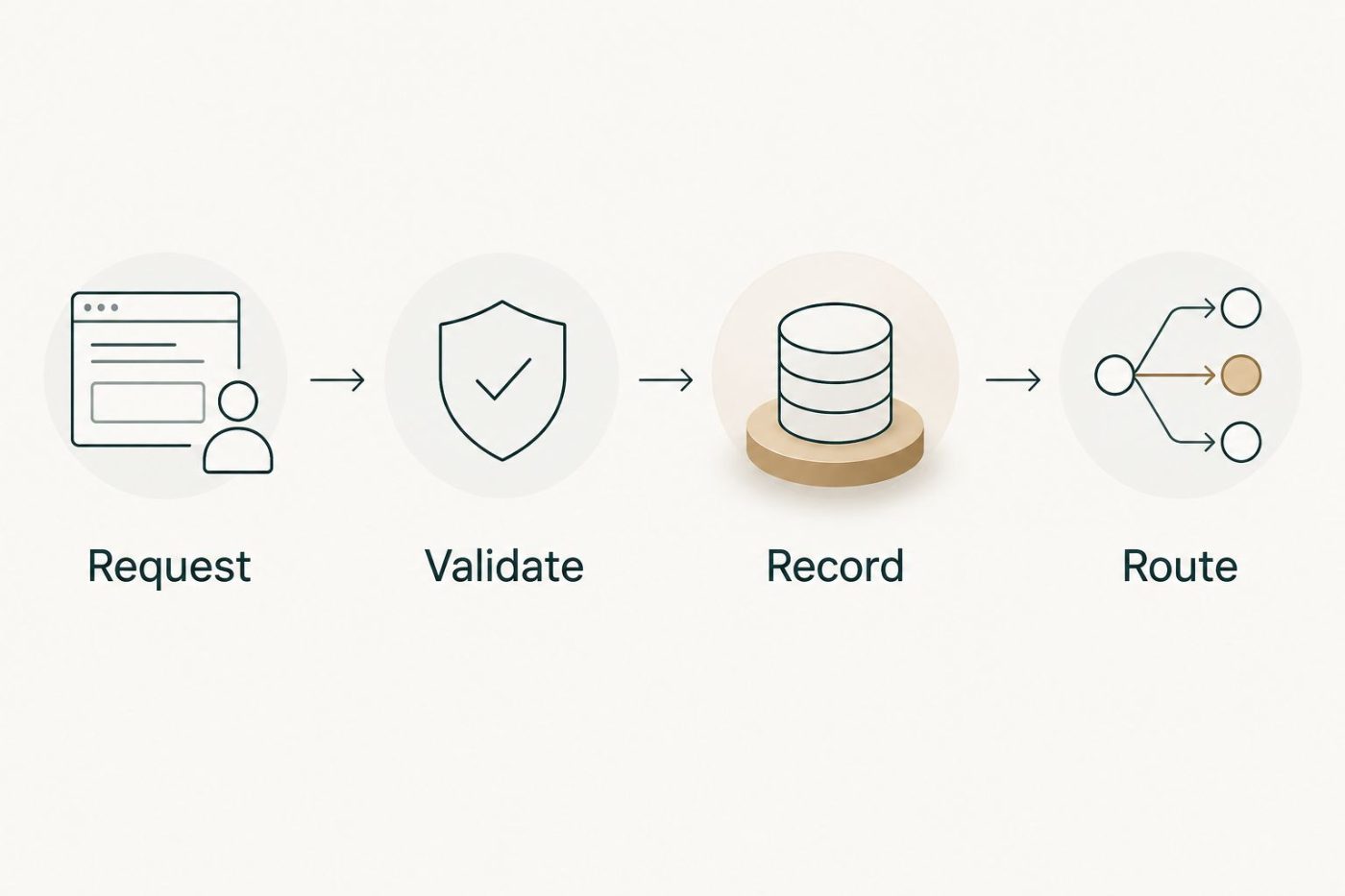
Validate the response before allowing a qualification result to change the workflow.
4. Routing and release controls
Use deterministic routing after validation: explicit rules should decide the next action. The model supplies an assessment; your business policy authorizes what happens next.
- Add a Decision element to branch on the validated category. Create separate paths for qualified leads, non-qualified leads, and human review.
- Use Update Records only for approved field changes. If changing ownership, use the approved assignment mechanism and verify that it does not conflict with existing Lead automation.
- Preserve the explanation and policy version alongside the current decision. Record human overrides separately so the original assessment remains distinguishable from the final sales decision.
- Test at least 3 Lead records: one that meets the policy, one that does not, and one missing required evidence. These are minimum test cases, not evidence of production accuracy.
- Test a failed integration response and a repeated response for the same request. Confirm that neither creates duplicate work or changes a completed decision unexpectedly.
- Review the test results with the business owner before selecting Activate. Document who can pause the workflow and how leads will be handled while automation is paused.
Expected result: Every eligible lead reaches an approved destination, exceptions have an owner, and an administrator can stop automation without losing the manual qualification process.
For the 2026 release baseline, record current manual handling effort and reviewer acceptance using your own operational records. Compare later results against that baseline; do not declare savings from the number of automated decisions alone.
Second workflow: requalify when relevant inputs change
Creation-only qualification misses information added later. Add update-based qualification only after the initial workflow behaves correctly and the business owner has identified which changes justify another evaluation.
| Workflow | Best for | Advantage | Limitation |
|---|---|---|---|
| Creation-only qualification | Best for consistent intake data | Narrower trigger scope and simpler initial review | Does not reassess information added later |
| Relevant-update qualification | Best for leads enriched after intake | Evaluates materially changed evidence | Needs change detection and stale-response controls |
In a separate flow, select A record is updated and restrict entry to changes in qualification inputs. Do not use changes to explanation, processing state, or decision fields as reasons to request another evaluation.
Compare the current input fingerprint with the last evaluated fingerprint before sending a request. If they match, stop. If an earlier request remains pending, define whether to replace it or finish it before evaluating the new information.
On response, compare the returned fingerprint with the current record. Discard or review a response based on obsolete inputs rather than overwriting a newer assessment. Preserve manual overrides according to the approved policy; a routine enrichment update should not silently erase a sales decision.
Troubleshooting
Leads repeatedly re-enter qualification
Check whether output-field updates satisfy the trigger conditions. Restrict entry to approved inputs, compare fingerprints, and ensure the processing state prevents repeated submission while a request is pending.
The external qualification action fails
Check the integration error, authentication configuration, callout permissions, and execution context. Keep the record in an exception state, retain a request identifier, and route it for review rather than converting a technical failure into a sales judgment.
The result sounds plausible but lacks evidence
Reject responses that do not meet the evidence contract. Refine the policy and request format, then rerun approved test cases; a polished explanation does not establish that a qualification decision is supported.
A qualified lead reaches the wrong owner
Inspect all ownership changes after the qualification response, including existing automation. Establish one approved routing authority instead of adding another competing assignment rule.
Updated leads receive outdated decisions
Compare request and current-input fingerprints before applying responses. A delayed response belongs to the information it evaluated, not automatically to the latest version of the Lead.
Customize your workflow
Expand scope only when the initial workflow produces decisions sales can inspect and use. Your 2026 operating review should cover overrides, unresolved exceptions, routing errors, and changes to qualification policy—not merely the volume processed.
National AI Consultants provides strategy, engineering, fractional leadership, ongoing management, and internal team training. Start with the AI Opportunity Assessment to establish whether the bottleneck requires automation, a process correction, or no build at all. Implementation follows when justified; an assessment is not a commitment to implementation.
Useful next extensions include account-level context, a documented reviewer feedback process, and supervised handoff into sales follow-up. Give each extension its own permission boundary and acceptance criteria before connecting it to customer-facing activity.
FAQ
What is Salesforce AI lead qualification?
Salesforce AI lead qualification uses an AI service to assess lead information against business criteria and record the result in Salesforce. A controlled workflow adds evidence requirements, validation, routing rules, and human review.
Can Salesforce Flow qualify leads without a separate AI connection?
Salesforce Flow can apply explicit qualification rules without AI, but the model-based workflow described here requires an approved AI connection. Confirm the available integration mechanism and permissions before building the flow.
Should AI automatically reject Salesforce leads?
Start with reviewable qualification decisions rather than automatic rejection. Authorize rejection only through an approved policy that defines sufficient evidence, exceptions, and override ownership.
How do I stop Salesforce qualification from running repeatedly?
Restrict the trigger to relevant inputs and compare the current input fingerprint with the last evaluated fingerprint. Exclude result-field changes and prevent repeated submission while an evaluation is pending.
Should I qualify leads when they are created or updated?
Start with creation-only qualification when intake data supports the decision, then add relevant-update qualification for later enrichment. Update-based evaluation also needs controls for repeated requests and outdated responses.
What should we measure in a 2026 qualification rollout?
Measure reviewer acceptance, overrides, unresolved exceptions, routing errors, and actual handling effort. Automated decision volume alone does not demonstrate better qualification or financial return.
Does an AI Opportunity Assessment commit us to implementation?
No. National AI Consultants positions the AI Opportunity Assessment as the first engagement, with implementation following when justified by the business decision.
One last thing
Keep a qualification failure separate from a negative qualification decision. A connection error says nothing about whether a prospect is a fit. That distinction protects both your pipeline and the credibility of your 2026 reporting.