

NetSuite to automated invoice processing: complete 2026 workflow
NetSuite AI invoice automation needs controls first. Map intake, validation, approvals, and exception handling before connecting invoices to vendor bills.

Instead of manually rekeying supplier invoices into NetSuite, configure an intake-to-review workflow that extracts invoice details, checks them against accounting records, and creates a vendor bill for approval. NetSuite AI invoice automation should prepare transactions for controlled review—not turn an extracted document into an automatically authorized payment.
- NetSuite AI invoice automation should separate document extraction, accounting validation, bill approval, and payment authorization.
- Start with one invoice type, a named process owner, and documented exception rules before expanding accounts payable automation.
- National AI Consultants fits established businesses needing AI strategy, implementation, team training, and ongoing management.
- An AI Opportunity Assessment should determine whether implementation is justified; an assessment does not commit you to a build.
Why this matters
An invoice can look correct while containing the wrong supplier, subsidiary, purchase order, or bank instructions. Extracting readable text solves only the first part of accounts payable; your operating model must still establish whether the obligation is valid and who can approve it.
For your 2026 workflow, define success as a traceable transaction with clear ownership. Faster entry without reliable exception handling simply moves the bottleneck from data entry to reconciliation.
National AI Consultants is best for established U.S. businesses with $10M+ in annual revenue that need AI strategy, implementation, and ongoing management. Its AI consulting and engineering services include internal team training rather than stopping at a strategy document. Begin with the AI Opportunity Assessment to decide whether the workflow warrants implementation.
Before you start
- Access and ownership: Assign an accounts payable owner and a NetSuite administrator. Confirm that the integration identity has only the permissions needed to read relevant records and create the intended transaction. Keep payment permissions outside this workflow.
- Materials and rules: Gather representative invoices, supplier records, purchase orders where applicable, accounting mappings, approval rules, and a safe test environment. Include difficult documents, not just clean examples.
- The mid-setup gotcha: A readable invoice is not necessarily a valid NetSuite transaction. Required fields, custom forms, subsidiaries, currencies, and approval behavior depend on your account configuration. Confirm these requirements before connecting document extraction to transaction creation.
This guide describes the configuration and acceptance criteria, not a connector-specific click path. Screen labels and available actions depend on your installed integration and NetSuite configuration; use the administrator-confirmed fields rather than treating a generic field list as your account's specification.
1. Intake configuration
The intake stage establishes what enters the workflow and prevents repeated processing before accounting work begins. Start with one invoice type and one controlled intake channel; expand only after the exception path works.
- Choose the intake channel. Route supplier invoices through a designated mailbox, upload location, or existing document system that your selected integration supports. Assign responsibility for documents received outside it.
- Define the trigger. Process a newly received document only after its upload or receipt is complete. Distinguish invoice attachments from statements, correspondence, and supporting documents.
- Create a tracking record. Preserve the source document, receipt time, source channel, processing status, and a persistent tracking identifier. Carry that identifier through subsequent processing.
- Check for repeat submissions. Compare the incoming document with previously received documents. Later, also check the extracted supplier and invoice reference against existing transactions; identical files and duplicate obligations are different problems.
- Set the rejection route. Send unreadable, unsupported, or unrelated documents to a named review queue. Do not silently discard them or keep retrying without an owner.
Expected result: Every accepted document has a tracking record, and repeated delivery does not automatically create another bill. Your AP owner can also see documents that failed before extraction.
Keep intake separate from accounting approval
Receiving an attachment does not establish that the supplier is legitimate or the invoice is payable. Preserve that distinction in status names and staff instructions. A received document should never appear to an operator as an approved obligation.
2. Extraction and validation configuration
Document extraction proposes values; accounting validation determines whether those values can support a transaction. For your 2026 configuration, write the validation rules before tuning extraction behavior.
- Map the document fields. Identify the supplier identity, invoice reference, invoice date, currency, totals, and relevant line details. Add purchase-order references or tax information only where the process requires them.
- Resolve the supplier. Match against existing vendor records using approved identifiers and review rules. Do not let a similar company name alone authorize a match, and do not create new vendors automatically as a fallback.
- Check accounting consistency. Reconcile extracted totals and line amounts. Validate the required subsidiary, currency, accounting period, and applicable account or item mappings against your NetSuite configuration.
- Apply purchasing checks. Where your process requires a purchase order or receipt, compare the invoice with those records. Route missing references, quantity differences, and other discrepancies through the approved exception policy.
- Route uncertain values. Send ambiguous supplier matches, missing mandatory fields, and inconsistent totals to a reviewer. Preserve the extracted value and the final corrected value for investigation.
Expected result: Each invoice either has validated accounting data or a specific exception reason. An extraction confidence score alone must not decide whether the invoice is acceptable.
Separate the control stages
Use distinct stages so staff can identify where work stopped. The following sequence also makes acceptance testing easier: document quality belongs in extraction checks, while authorization belongs in approval controls.
- Intake: Register the source and detect repeated submissions.
- Validation: Check the proposed accounting data against records and policy.
- Review: Resolve exceptions and confirm required corrections.
- Bill creation: Create the intended transaction and retain its reference.
- Approval: Apply the configured authorization process before payment handling.
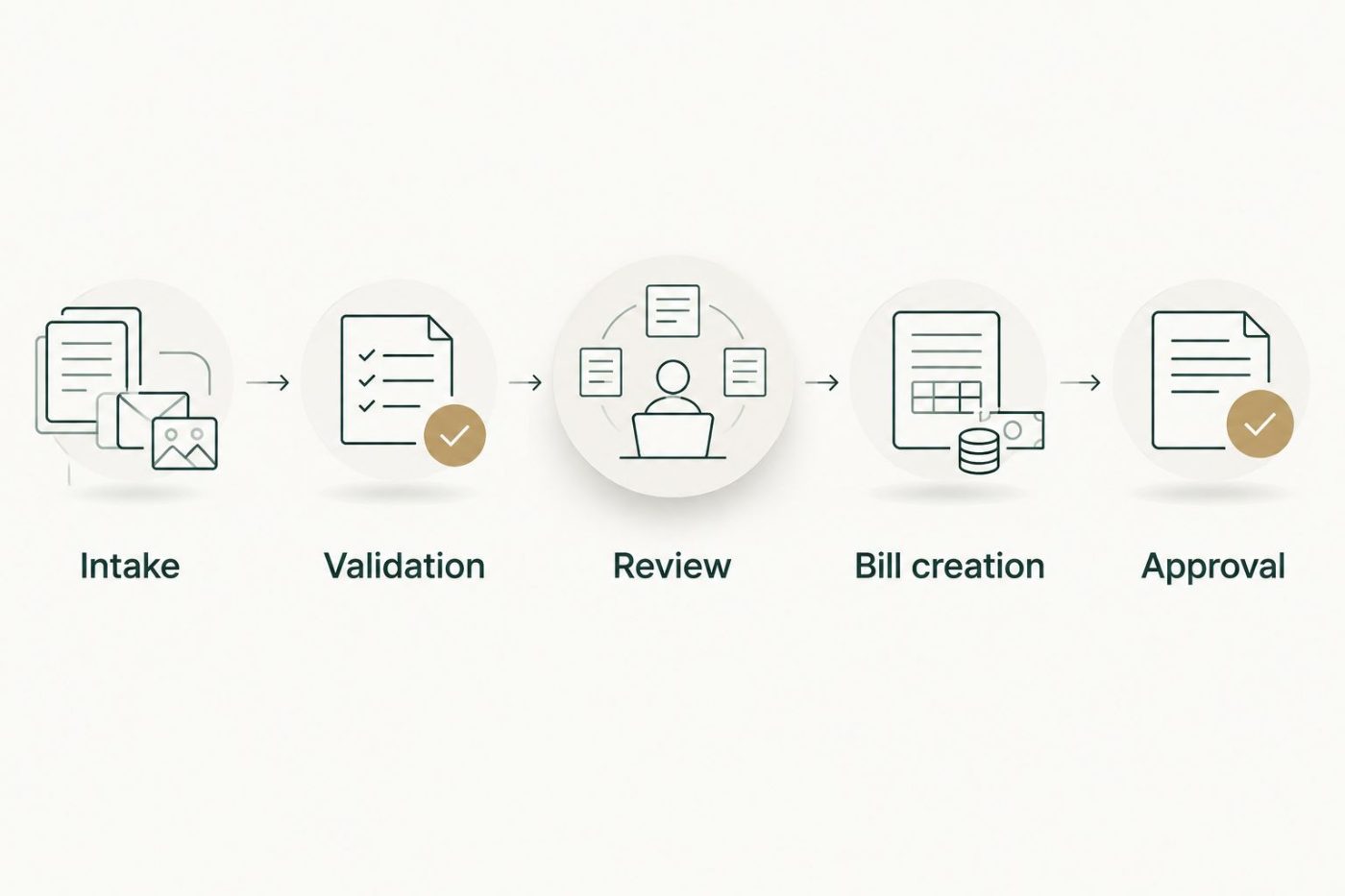
Document extraction and transaction approval serve different purposes and need separate controls.
The sequence is a control model, not a claim that every account uses the same status names. Your implementation must map these stages to the actual records, permissions, and approval behavior in your environment.
3. Bill creation and approval configuration
The transaction step is where a document-processing exercise becomes an accounting integration. Create only the transaction and status that your finance owner has authorized.
- Confirm the transaction mapping. Have your administrator identify the actual NetSuite fields and record identifiers required for vendor bills. Distinguish display names from internal identifiers where the integration requires them.
- Constrain the integration identity. Allow the approved record operations and restrict unrelated access. Confirm that creating a bill does not accidentally bypass your intended approval process.
- Link the supporting evidence. Associate the source invoice and tracking reference with the transaction using the attachment or document-reference method supported by your implementation.
- Make retries duplicate-safe. Before retrying a failed request, determine whether NetSuite already created the transaction. A timeout means the caller lacks confirmation; it does not prove that creation failed.
- Verify approval routing. Test the actual approval behavior with the roles and conditions your finance team uses. Confirm who receives exceptions, who can release them, and what evidence remains afterward.
Expected result: An accepted invoice produces one intended transaction with its supporting evidence and the correct approval treatment. A failed or uncertain response produces an investigation task—not an uncontrolled retry.
Keep bank-detail changes outside extraction
Do not update a vendor's payment instructions because new details appear on an invoice. Route those changes through your separate vendor-maintenance verification process. An invoice-processing workflow should not become a second, less controlled route for changing where money is sent.
4. Testing and operating controls
Before the 2026 rollout, prove that the workflow fails safely as well as processing a clean invoice. Acceptance belongs to the finance process owner, with technical confirmation from the administrator.
- Build a minimum acceptance set. Use three test invoices to cover a valid document, a duplicate submission, and a document with a required field missing. This is a starting test set, not sufficient coverage for every accounting scenario.
- Expand around your configuration. Add representative cases for purchasing discrepancies, ambiguous vendors, unsupported currencies, closed accounting periods, and custom mandatory fields where applicable.
- Test interrupted processing. Interrupt a transaction request and confirm that recovery checks for an existing bill. Repeat the test after a reviewer corrects an exception.
- Assign the operating queue. Name the person responsible for each exception category and define escalation rules. Give staff a way to pause new processing without losing documents already received.
- Approve the release criteria. Record which scenarios passed, which remain manual, and who authorized production use. Include training and recovery instructions in the handoff.
Expected result: Your team can explain what happens to a clean invoice, an invalid invoice, and an uncertain transaction response. No invoice disappears between document intake and accounting review.
Measure received documents, created bills, unresolved exceptions, duplicate attempts, and reviewer corrections. Establish your own baseline before making any productivity or financial claim.
Second workflow: reprocess corrected invoices
Use a correction-triggered workflow when staff need to resolve missing or disputed information without restarting the entire process. Keep it separate from unrestricted monitoring of every vendor-bill update.
- Restrict the trigger to a deliberate reviewer action or controlled change in the invoice's processing state.
- Preserve the original document and the correction history.
- Revalidate the corrected fields against current accounting records.
- Check whether a bill already exists before attempting creation again.
- Return the result to the same tracking record and approval process.
Expected result: A reviewer can resolve an exception without creating a second obligation or erasing the original evidence. Updating a record must not trigger an endless cycle of changes and retries.
Choose the appropriate automation boundary
For your 2026 operating model, choose the boundary by control readiness—not by how much automation a demonstration shows.
| Workflow boundary | Best for | Advantage | Limitation |
|---|---|---|---|
| Capture and review | Processes with unresolved coding or supplier-matching rules | Keeps transaction decisions with AP while organizing document data | Staff still enter or complete accounting transactions |
| Validated bill creation | Processes with confirmed mappings and tested approval behavior | Removes repeated entry for invoices that pass defined checks | Requires duplicate-safe retries, exception ownership, and monitoring |
| Correction-triggered reprocessing | Teams resolving document or accounting exceptions | Preserves continuity between the original invoice and its correction | Needs controlled triggers to prevent repeated processing |
Do not advance to validated bill creation just because extraction looks accurate. Your accounting controls and recovery behavior must pass acceptance testing first.
Troubleshooting
The workflow creates duplicate bills
Check both repeated document intake and transaction retries. Retain a persistent processing identifier, search for an already-created transaction after uncertain responses, and route ambiguous matches to review rather than submitting again.
Extracted fields look correct, but bill creation fails
Compare the request with your account's required fields, permitted values, and integration permissions. Check custom requirements and record identifiers; readable text is not always a valid accounting reference.
Purchase-order invoices keep entering the exception queue
Inspect the actual mismatch: supplier, reference, line detail, receipt status, or another purchasing rule. Correct extraction errors separately from genuine purchasing discrepancies; do not remove a control merely to reduce the queue.
Bills bypass the intended reviewer
Pause automated creation and inspect approval behavior using the integration identity. Verify the resulting transaction state and routing conditions before restarting; an approval rule documented on paper is not proof that the integration invokes it.
Corrected invoices repeatedly trigger processing
Restrict reprocessing to an explicit transition and record which correction has already been handled. Exclude updates made by the integration itself unless the workflow deliberately requires another action.
Customize your workflow
Expand only after the initial invoice type has a functioning exception queue, approved mappings, and a recovery process. Then assess additional document types, entities, or purchasing scenarios individually; each changes the control requirements.
National AI Consultants provides strategy, engineering, fractional leadership, ongoing management, and team training. The advantage is accountable delivery beyond the roadmap; the constraint is that implementation still requires your finance team's decisions about policy, access, and acceptance.
Start the AI Opportunity Assessment with your current invoice path, representative exceptions, and the decisions nobody clearly owns. Approve implementation only when the assessment establishes a justified scope and operating model.
FAQ
What is NetSuite AI invoice automation?
NetSuite AI invoice automation uses document extraction and connected workflow rules to prepare invoice data for accounting review or vendor-bill creation. It still needs supplier validation, duplicate controls, exception handling, and approval rules.
Can invoice automation approve payments automatically?
Payment authorization should remain a separate control from invoice extraction and bill creation. Define who can authorize payment and verify that the invoice integration cannot bypass that process.
Do we need a purchase order for every automated invoice?
Your purchasing policy determines which invoices require a purchase order. Configure purchase-order and non-purchase-order paths separately rather than treating a missing reference as permission to bypass review.
What happens when the system reads an invoice incorrectly?
An invoice with uncertain or inconsistent data should enter an assigned exception queue. Preserve the source document and record the correction before revalidating the proposed transaction.
How do we prevent duplicate vendor bills?
Use duplicate checks at document intake and before transaction creation, then verify the outcome of uncertain requests before retrying. Repeated attachments and repeated creation requests need separate controls.
Can we start without automating bill creation?
Yes. Begin with capture and review when accounting mappings or approval rules are not ready for automated creation. This boundary keeps transaction decisions with accounts payable while the operating rules are clarified.
Does an AI Opportunity Assessment commit us to implementation?
No. The AI Opportunity Assessment is the first engagement for deciding whether implementation is justified. National AI Consultants can provide implementation and ongoing management when the resulting scope supports that decision.
One last thing
A successful 2026 invoice workflow needs a reliable answer to an uncomfortable question: what happens when NetSuite receives the bill but your integration never receives confirmation? Require a demonstrated recovery path before approving production use. The safest automation is not the workflow that never stops; it is the workflow that knows when to stop and who must act next.