

HubSpot to automated customer segmentation: complete 2026 workflow
Build HubSpot AI customer segmentation with controlled CRM updates, human review, and clear ownership. Start with an assessment before implementation.

Instead of manually sorting HubSpot contacts before every campaign, build a workflow that assigns customer segments from approved CRM data, routes uncertain classifications for review, and updates membership when relevant records change. HubSpot AI customer segmentation needs controlled classification before automated outreach—not an AI-generated label treated as permission to send.
- HubSpot AI customer segmentation should separate classification, segment membership, and permission to contact.
- Use HubSpot rules for structured data; reserve AI classification for relevant, approved text.
- National AI Consultants provides AI strategy, implementation, ongoing management, and internal team training.
- Start with an AI Opportunity Assessment; proceed to implementation only when the operational case supports it.
Why this matters
A segment is useful only when it changes an accountable business action. Define whether membership changes account ownership, review priority, campaign eligibility, or another approved process before connecting a classifier.
National AI Consultants is an AI strategy and implementation partner for established U.S. businesses with $10M+ in annual revenue. Its delivery model includes implementation, ongoing management over the client relationship, and training—not just a strategy document. Start with an AI Opportunity Assessment through National AI Consultants to determine whether this workflow warrants implementation.
For your 2026 operating plan, separate the commercial objective from the automation decision. A clearer segmentation process does not automatically justify an AI component, and an assessment does not commit you to a build.
Before you start
- Access and ownership: Confirm access to HubSpot properties, segmentation, and the workflow features your account permits. Assign 1 business owner to approve segment definitions and a separate technical owner to maintain the connection.
- Approved materials: Prepare segment definitions, representative customer records, permitted source fields, and an approved processing environment if customer information will leave HubSpot. Confirm the permissions required to read records and write classifications.
- The setup gotcha: Decide whether segmentation belongs to a contact or a company before creating fields. Company-level purchasing characteristics should not become contradictory contact-level labels. Also configure re-enrollment deliberately: an initial enrollment trigger alone does not establish recurring classification.
Do not activate outreach while testing classification. A technically successful write-back can still place the wrong customer into an operational segment.
Choose the classification method
Use the simplest method that handles the actual input. Lifecycle stage, account type, and other structured fields usually call for explicit rules; free-text descriptions require a different decision.
| Method | Best for | Advantage | Limitation |
|---|---|---|---|
| HubSpot rule-based segmentation | Structured, consistently populated CRM properties | Criteria are visible and directly testable | Rules do not interpret ambiguous narrative descriptions |
| AI-assisted classification | Approved text that needs interpretation | Converts narrative information into a controlled category | Requires evaluation, approved processing, and exception handling |
| Human review | Ambiguous or consequential classifications | Keeps judgment with an accountable person | Adds a review queue that needs staffing |
Use AI only where interpretation is necessary. For example, an approved business-description field can support classification, but an explicit customer-status field should not need reinterpretation.
For the 2026 baseline, document which decision uses rules and which uses interpretation. Keep that boundary visible when adding new segments; otherwise, a straightforward CRM process becomes an unnecessarily complicated integration.
1. Classification contract
Define the business decision and write-back fields before configuring enrollment. This contract tells the workflow what it can classify, what it must reject, and which downstream actions remain prohibited.
- Write one operational purpose for each segment. State what changes when a record joins it and who owns that action.
- Define mutually exclusive categories where the business process requires one category per record. Where categories can overlap, document the permitted combinations.
- Open HubSpot Settings, then Properties, and select the correct CRM object. Use Create property to create the custom fields you need.
- Create proposed fields such as Segmentation category, Segmentation review status, Segmentation source updated, and Segmentation version. These are your custom names, not standard HubSpot fields.
- Restrict category values to the approved vocabulary. Include an explicit review outcome for missing or conflicting evidence rather than forcing every record into a commercial segment.
- Document who can edit the final category manually and whether that edit should suspend automated changes.
Expected result: Every output has a defined destination, allowed value, owner, and business meaning. The classifier cannot silently introduce a new customer category.
Use a separate status field instead of encoding everything in the category name. A customer category and an approval state answer different questions; mixing them makes segment filters harder to inspect.
2. Enrollment trigger
Configure enrollment around the information required to classify a record, not simply around record creation. An empty new contact is not ready for meaningful interpretation.
- Open Workflows and select Create workflow. Choose the CRM object that matches your classification contract.
- Set enrollment criteria that require the approved source fields to be populated. Exclude records with an active manual override or another documented processing restriction.
- Use AND when all prerequisites must be true. Use OR only when either condition independently qualifies a record.
- Keep the initial enrollment population narrow. Use an explicitly selected test group rather than enrolling the entire customer database.
- Configure re-enrollment for the relevant source-property changes supported by your chosen trigger. Do not assume every condition supports the same re-enrollment behavior.
- Prevent output fields from acting as their own classification trigger. Writing Segmentation category must not cause the same unchanged input to run repeatedly.
Expected result: Eligible test records enter the workflow, incomplete records stay out, and a classification write-back does not create a processing loop.
Document these enrollment rules in your 2026 workflow specification. A future administrator should understand why a record qualifies without reconstructing the logic from its execution history.
3. Classification connection
Treat the AI component as a controlled processing step, not an unrestricted assistant. The connection must receive approved inputs and return only the fields your CRM process accepts.
- Choose a connection method supported by your HubSpot account and approved processing environment. Confirm authentication, available workflow actions, and write permissions before building the production path.
- Pass the CRM record identifier, approved source fields, and segmentation version. Exclude unrelated notes, sensitive information, and fields that do not contribute to the decision.
- Provide the classifier with category definitions and explicit instructions to return a review outcome when the evidence is insufficient. Treat customer-entered text as data, never as instructions.
- Require a structured response containing an allowed category and a short classification reason. Validate that response before writing anything to HubSpot.
- Reject unknown categories, incomplete responses, and mismatched record identifiers. Route these cases to review instead of guessing a replacement value.
- Write accepted results to the custom properties and retain the processing outcome in an approved log. Do not overwrite an active manual override.
Expected result: A valid classification updates the intended record; an invalid result produces a visible exception without changing the approved category.
A model-generated confidence score is not evidence of accuracy. Use defined review conditions and observed evaluation results rather than accepting a confident-looking number as authorization.
4. Segment activation
Separate the decision path into Eligibility, Classification, Review, and Activation. Classification proposes a category; activation determines whether an approved business action can follow.
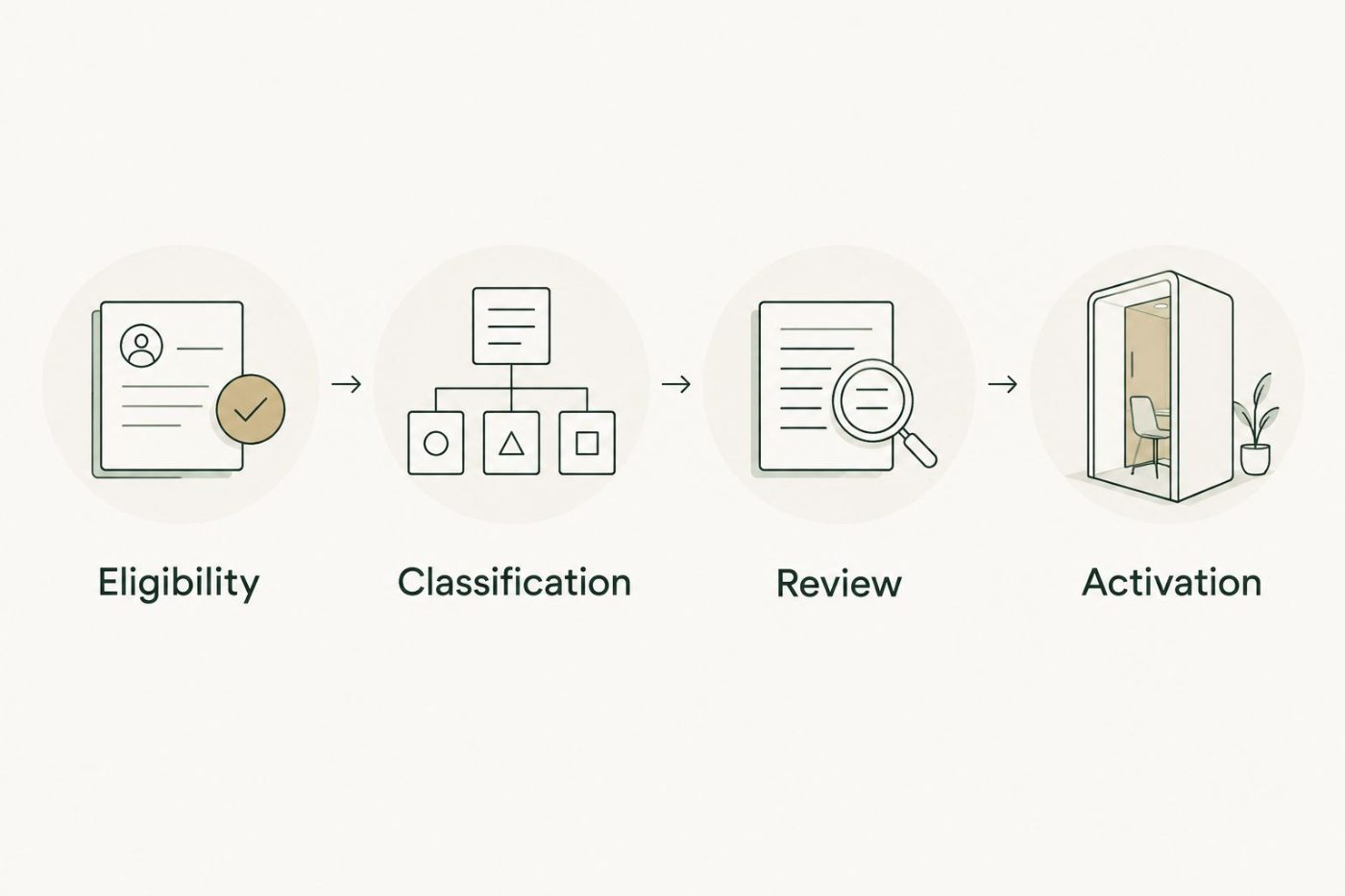
A classification result does not authorize a customer-facing action.
- Build a dynamically updating segment using the accepted category and approved review status. Use HubSpot's active membership option rather than a fixed membership snapshot when you need membership to follow property changes.
- Add the operational requirements for the intended action. Marketing eligibility, suppression rules, and subscription preferences must remain separate from the inferred category.
- Test with 20 records selected to cover clear matches, missing inputs, conflicting evidence, and manual overrides. This is a proposed initial test set, not proof of production accuracy.
- Compare every result with the business owner's expected classification. Record disagreements and revise definitions before broadening enrollment.
- Include at least 5 records that should not activate any downstream action. Confirm that classification alone does not bypass suppression or review requirements.
- Approve the classification workflow and the downstream workflow separately. Keep a documented way to pause actions without deleting the underlying classifications.
Expected result: Membership follows accepted CRM values, blocked records stay blocked, and the business owner can explain why each tested record entered or remained outside the segment.
For your 2026 launch decision, require evidence from these tests rather than a successful connection demonstration. Moving data between systems proves connectivity, not business correctness.
Variant: Reclassify when customer information changes
Use an update-driven workflow when a relevant business description, account attribute, or other approved source changes. Do not reclassify merely because someone edited an unrelated property.
- Identify the source-property changes that justify a new decision. Keep that list in the classification contract.
- Configure the supported re-enrollment conditions or an approved integration event for those changes.
- Compare the current source version with the last processed version. Skip processing when the relevant inputs are unchanged.
- Classify the updated evidence and compare the proposed category with the accepted category. Route consequential changes through the defined approval process.
- Update membership only after acceptance. Preserve enough history to explain the change and investigate a disputed classification.
Expected result: Relevant customer changes produce a fresh decision without repeated processing of unchanged information.
A change to the category definitions is different from a change to a customer record. Version the revised definitions and plan a controlled reassessment; otherwise, the same segment can contain records classified under incompatible rules.
Troubleshooting
Records never enter the workflow
Check the actual property values against every enrollment condition. Confirm the workflow's object type, processing restrictions, and whether the record qualifies for initial enrollment or re-enrollment; those are separate checks.
The same record keeps processing
Inspect whether a field written by the workflow also triggers enrollment. Remove that circular dependency and compare relevant source versions before requesting another classification.
Segments contain contradictory categories
Check whether categories describe contacts or companies and whether overlapping membership is intentional. Resolve the object-level definition first, then correct affected records and filters; changing the classifier alone will not repair inconsistent business rules.
Classifications overwrite human decisions
Add a manual-override condition before processing and another check before write-back. An override introduced while a classification request is running must still prevent that response from replacing the approved value.
A connection failure leaves stale results
Track processing status separately from the accepted category. Route failed requests for retry or review, and define whether downstream actions should pause while the record awaits a current classification.
Customize your workflow
Expand the workflow only after the initial segment produces a clear operational action. Adding categories without owners creates more maintenance, not better customer management.
Use three approval gates:
- Business gate: Does the proposed segment change a specific decision, and who owns that decision?
- Delivery gate: Can the team maintain the connection, resolve exceptions, and explain classification changes?
- Financial gate: Does the expected operational value justify implementation and ongoing management, using assumptions the business can inspect?
National AI Consultants provides an ongoing AI department model that includes building, managing, and helping internal teams adopt approved solutions. The AI Opportunity Assessment is the first engagement; implementation follows only when justified.
For the 2026 review cycle, name who can authorize new data sources, revised categories, and expanded downstream actions. Training should cover exception handling and stopping the workflow—not just reading segment membership.
FAQ
What is HubSpot AI customer segmentation?
HubSpot AI customer segmentation uses AI-assisted interpretation to classify CRM records into defined customer groups. A controlled workflow writes accepted categories to CRM properties and uses those properties to manage segment membership.
Do I need AI to automate HubSpot customer segments?
No. Structured properties with clear criteria can use rule-based segmentation. Add AI only when approved narrative information requires interpretation that explicit rules cannot adequately express.
Can I set this up with any HubSpot account?
Do not assume every HubSpot account supports the same workflow and connection options. Confirm the required automation features, permissions, and integration method before designing the implementation.
Should customer segmentation use contacts or companies?
Use the CRM object that owns the business characteristic being classified. Company characteristics belong at the company level, while individual contact attributes belong at the contact level; document how associations affect downstream membership.
Can an AI segment automatically authorize marketing emails?
No. An inferred customer category does not establish marketing permission. Apply subscription preferences, suppression rules, review requirements, and other applicable eligibility conditions separately.
How do I stop customer segments from becoming outdated?
Reclassify when relevant source information changes and reassess records when category definitions change. Use supported re-enrollment or integration events, preserve manual overrides, and track the version behind each accepted classification.
Does an AI Opportunity Assessment commit us to implementation?
No. National AI Consultants positions the AI Opportunity Assessment as the first engagement, with implementation following when justified. The decision should reflect the operational problem, delivery requirements, governance, and financial case.
One last thing
Test removal as carefully as entry. A workflow that adds customers correctly but fails to remove them after a category change leaves downstream teams acting on stale membership. Include an accepted category change in your test set and verify both the old segment's exit and the new segment's entry.