

How to connect Workday to an AI-powered HR helpdesk
Connect Workday AI HR helpdesk workflows read-only first. Set identity checks, restricted access, policy controls, and HR escalation before launch.

Instead of manually checking Workday and answering the same employee questions, connect Workday to an AI-powered HR helpdesk that verifies identity, retrieves permitted information, and routes exceptions to HR. Start with read-only answers and approved policies; add record-changing actions only after you establish authorization, approval, and audit controls.
- Connect Workday AI HR helpdesk workflows with verified identity, restricted data access, approved policies, and human escalation.
- National AI Consultants provides ongoing AI department services for established businesses needing implementation, management, and internal team training.
- Start read-only: answering an employee question and changing a Workday record require different controls.
- Use the AI Opportunity Assessment to decide whether implementation is justified, not to commit to a build.
Why this matters
A Workday connection does not make an HR answer correct or appropriate. The helpdesk also needs to know who is asking, which information that person can access, and when a question requires an HR decision rather than a generated response.
National AI Consultants serves established U.S. businesses with $10M+ annual revenue that need an accountable, ongoing AI department. Its delivery model includes implementation, management over the client relationship, and internal team training—not just a strategy document.
Begin with the AI Opportunity Assessment through National AI Consultants. The first decision is whether the operational problem warrants an integration at all. A clearer policy or better routing rule can be the right answer instead of a build.
For your 2026 rollout, define success as a controlled service: employees receive authorized answers, HR receives actionable exceptions, and an assigned owner can inspect what happened.
Before you start
- Secure the necessary access. Involve your Workday administrator, identity administrator, HR policy owner, and helpdesk owner. Confirm the integration method your tenant and helpdesk support before designing the connection.
- Prepare the source material. Identify approved HR policies, their owners, and their applicable employee populations. List the Workday fields needed for the initial use case, excluding fields that do not affect the answer.
- Resolve the identity gotcha first. A signed-in helpdesk user is not automatically matched to the correct Workday worker. Define a trusted mapping and test ambiguous or missing matches before permitting employee-specific retrieval.
Do not begin configuration until someone owns each prerequisite. Missing policy ownership is a deployment blocker, just as missing technical access is.
Choose the workflow boundary
Separate information delivery from transactions. Both can belong in an HR service, but they create different operational obligations.
| Workflow | Best for | Benefit | Limitation | Initial decision |
|---|---|---|---|---|
| Read-only HR answers | Approved policy questions and permitted employee-specific lookups | Keeps record changes outside the initial integration | Still requires identity checks, current sources, and restricted access | Start here |
| Approved HR transactions | Clearly defined requests that need a Workday change | Connects an employee request to a controlled action | Requires separate authorization, validation, approvals, and recovery procedures | Add only when justified |
Read-only is a narrower scope, not a privacy exemption. An answer can expose sensitive information even when the integration never changes a record.
Select a contained use case, such as explaining an approved policy and routing an employee's unresolved question to HR. Do not combine general policy search, personal records, manager access, and automated transactions into the first release.
Identity mapping
- Define the requesting employee. Use your organization's authenticated identity, not a name or employee number typed into the conversation. Ask the identity and Workday administrators to agree on the trusted identifier used to associate that account with a worker record.
- Separate the identities. Document 2 identity roles: the requesting employee and the integration service. The service retrieves information; the employee's verified identity determines whose information the workflow is allowed to retrieve. Service access must not become blanket employee access.
- Specify failed-match behavior. Stop personal-data retrieval when the mapping is absent, ambiguous, or inconsistent. Offer a general policy answer when appropriate, or route the request to HR without revealing candidate worker records.
- Test role boundaries. Exercise employee self-service and any manager workflow separately. A manager's access requires its own authorization rules; a reporting relationship alone is not your complete permission specification.
Expected result: An authenticated request resolves to an authorized worker context or stops safely. The helpdesk never asks the model to guess which employee record belongs to the requester.
Record the identity mapping rule in your 2026 configuration register. Include the responsible administrator and what happens when an account or employment relationship changes.
Workday access
- Choose the supported connection method. Have the Workday administrator and helpdesk implementer confirm the available API or connector, authentication approach, and permitted operations. Verify actual support for your use case rather than assuming that a connector labeled Workday exposes every required field.
- Create restricted integration access. Configure a dedicated integration identity using your organization's Workday security process. Grant only the access required for the selected lookup. Keep the initial integration read-only, and do not reuse an administrator's personal credentials.
- Define the retrieval contract. Specify the permitted request, required identity context, returned fields, and failure behavior. For an employee-specific lookup, enforce the authorized worker scope in the application or connector layer—not merely in instructions given to the model.
- Store credentials outside conversations. Use your approved secret-management mechanism. Keep credentials out of prompts, uploaded policy documents, employee messages, and diagnostic text visible to end users.
Expected result: A permitted lookup returns only the approved fields for the authorized worker. An unauthorized lookup fails without exposing another employee's information.
For the 2026 release, document each integration permission alongside the use case that requires it. Remove permissions with no stated purpose. This gives the security reviewer a concrete boundary to approve rather than an open-ended request for HR access.
Answer controls
- Separate policy from personal facts. Use approved policy documents for policy explanations and Workday for permitted employee-specific facts. Do not let the helpdesk turn an individual record into a general company policy or substitute a general policy for an employee-specific determination.
- Define source precedence. Identify which source governs each answer type and what happens when sources disagree. Require policy references in employee-facing explanations where appropriate. If the governing source is missing or conflicting, stop the answer and escalate.
- Specify restricted questions. Route questions requiring HR judgment, investigations, or sensitive employment decisions to authorized staff. Define the boundary with HR leadership. The helpdesk can explain a process without deciding an employee's entitlement or resolving a dispute.
- Create a useful handoff. Send HR the employee's request, verification status, relevant approved context, and the unresolved issue. Exclude unnecessary personal information and restrict the receiving queue to authorized staff.
Expected result: The helpdesk produces a source-grounded answer within scope or creates an actionable HR handoff. It does not fill gaps with plausible policy language.
Use this configuration sequence as the operating model: Identity mapping, Workday access, Answer controls, and Release controls. Each stage establishes a boundary the next stage must preserve.
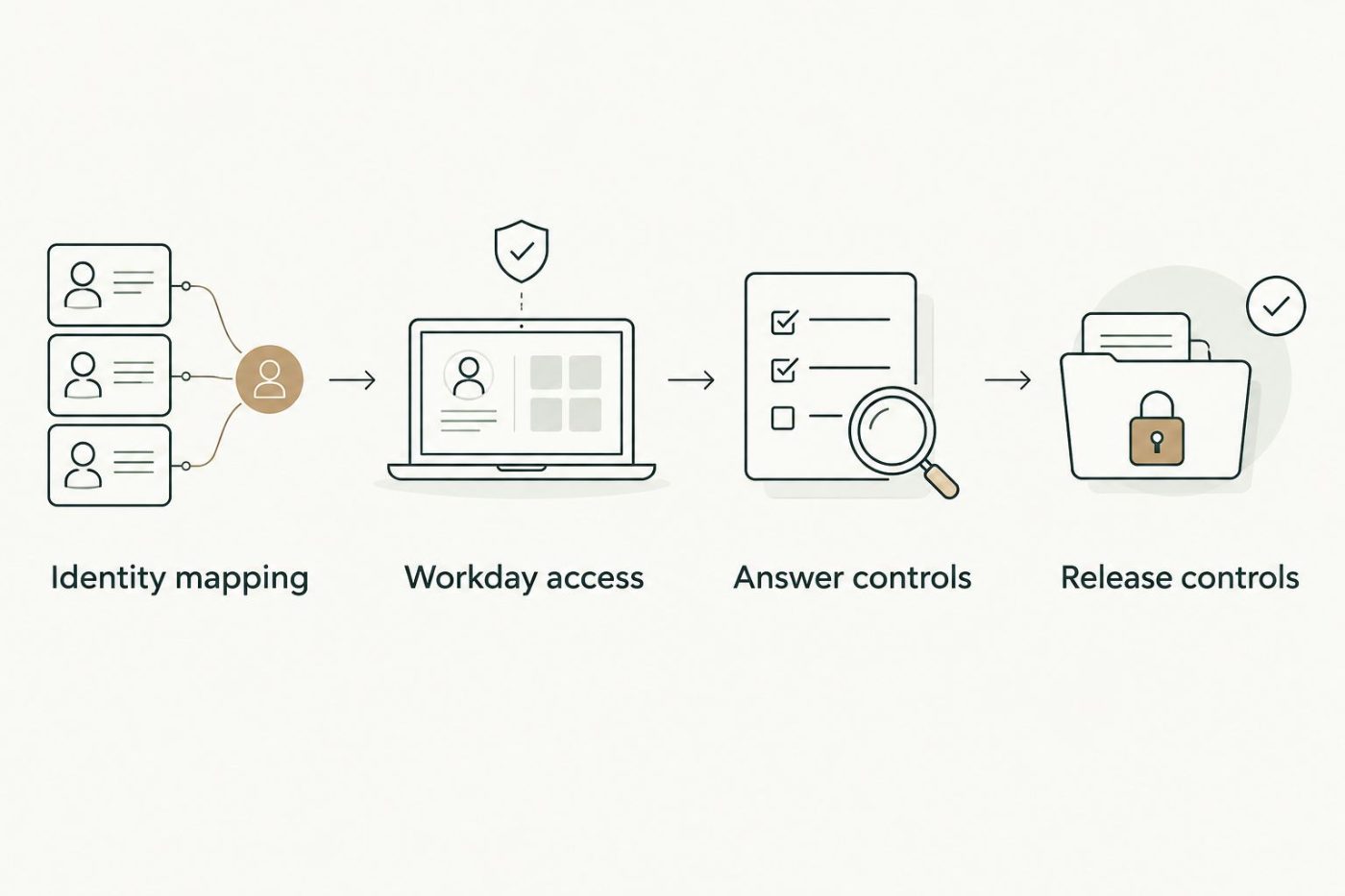
Establish identity and access boundaries before releasing employee-facing answers.
Release controls
- Assign ownership. Name 1 process owner accountable for the HR service, with named technical and policy counterparts. Specify who approves policy changes, fixes access failures, reviews exceptions, and authorizes any future transaction capability.
- Build an acceptance set. Include a correct policy answer, an employee-specific lookup, an unauthorized request, an ambiguous identity, a conflicting policy, and a connection failure. Use approved test data and review the expected outcome with HR before execution.
- Configure service visibility. Define 3 request states: answered, escalated, and failed. Record the disposition, relevant source reference, and technical outcome without retaining unnecessary sensitive content. Apply your organization's retention and access requirements to logs and transcripts.
- Release within the tested scope. Train the participating employees and HR team on supported questions, escalation, and reporting an incorrect answer. Confirm that disabling the integration leaves a usable HR support route rather than a dead end.
Expected result: The operating owner can explain what the helpdesk handles, inspect exceptions, and suspend the connection without losing employee support.
Your 2026 acceptance record should show both successful answers and successful refusals. Blocking an unauthorized request is a passing test, not an adoption failure.
When a Workday record changes
A related workflow keeps helpdesk context aligned with changes in Workday. Use it only when your supported integration method provides an appropriate change notification or scheduled retrieval mechanism.
- Choose the relevant change. Identify a specific field or relationship used by the helpdesk. Do not copy the entire worker record simply because the source exposes it.
- Refresh the permitted context. Update or invalidate the affected information after confirming the worker identifier and authorization rules. Design repeated processing of the same change so it does not create duplicate work.
- Recheck access at request time. Previously cached information must not bypass current authorization. Define how stale context is rejected and how employees reach HR during a refresh failure.
- Separate refresh from action. Updating helpdesk context must not silently authorize a Workday transaction. Treat record-changing actions as a separate scope with explicit approval requirements.
Expected result: Relevant changes refresh the helpdesk's permitted context without broadening access or generating duplicate requests.
The benefit is less manual context maintenance. The trade-off is another dependency to monitor: failed refreshes need an owner and a recovery procedure.
Troubleshooting
Workday returns an access error
Check authentication and the integration identity's permissions for the exact operation and fields requested. Ask the Workday administrator to inspect the failure; do not solve a narrow permission problem by granting broad administrative access.
The helpdesk finds the wrong worker
Disable employee-specific retrieval until the identity mapping is corrected. Inspect the trusted identifier and duplicate-match handling. Do not ask the employee to choose from a list of exposed worker records.
A correct policy produces an incorrect answer
Inspect the retrieved policy version, applicable employee population, and source precedence. Remove superseded or irrelevant documents from the answer path, then rerun the acceptance case. Better wording cannot repair the wrong source.
The answer uses stale personal information
Inspect cached context and the refresh mechanism. Invalidate the affected data, confirm the current authorized source, and test the failure route. Do not describe the connection as live unless its actual behavior supports that description.
HR receives incomplete escalations
Require the unresolved question and verification status in the handoff. Check queue access and routing ownership. A ticket created successfully is not a successful handoff if the authorized HR team cannot understand or act on it.
Customize your workflow
Expand only after the initial workflow has an accountable owner and accepted controls. Use observed exceptions to decide whether the next improvement belongs in policy content, identity mapping, routing, or integration logic.
For your 2026 roadmap, assess each proposed addition against the same decision criteria:
- Operational need: Which recurring bottleneck does this remove?
- Authority: Who can request, approve, and inspect the action?
- Information: Which sources and fields are necessary?
- Recovery: What happens when the connection or answer fails?
- Financial clarity: Who approves implementation and ongoing management obligations?
National AI Consultants provides outsourced AI strategy, engineering, and fractional leadership, with implementation and ongoing management when justified. The AI Opportunity Assessment is the first engagement; it does not commit you to building this integration.
FAQ
How do I connect Workday to an AI-powered HR helpdesk?
Connect authenticated employee identity, restricted Workday access, approved policy sources, and an HR escalation route. Start with a contained read-only use case, then test authorization and failure handling before release.
Does an AI HR helpdesk need permission to change Workday records?
No. A read-only HR helpdesk can answer approved questions and retrieve permitted information without changing records. Transactions require a separate scope with authorization, validation, and approval controls.
Can employees ask about another person's Workday information?
The helpdesk must enforce the requester's authorized scope before retrieving personal information. A typed name or employee identifier is not sufficient authorization, and manager access needs separately defined rules.
What happens if Workday and an HR policy give conflicting information?
The helpdesk should stop the affected answer and route the conflict to the designated HR owner. Define source precedence in advance rather than asking the model to decide which source governs.
Do we need a specific helpdesk product for this integration?
Choose a helpdesk only after confirming the required identity controls, Workday connection method, source handling, and escalation behavior. A connector name alone does not establish that the product supports your intended workflow.
How should we measure whether the HR workflow is working?
Review answered, escalated, and failed requests alongside acceptance-test results and employee-reported errors. Keep unauthorized requests blocked, and do not treat fewer escalations as success when questions require HR judgment.
Does the AI Opportunity Assessment commit us to implementation?
No. National AI Consultants starts with the AI Opportunity Assessment to determine whether implementation is justified. An assessment is not a commitment to build a Workday integration.
One last thing
Test a request the helpdesk must refuse before celebrating an answer it gets right. A correct explanation demonstrates usefulness; a controlled refusal demonstrates that the service respects its operating boundary. You need both before expanding access.