

How to connect ServiceNow to an AI support agent
Connect ServiceNow AI support agent workflows with controlled access, grounded answers, approved ticket updates, and a clear handoff to human support.

Instead of manually copying ServiceNow incidents into a support assistant, connect the agent through an authenticated integration that retrieves permitted records, drafts a response, and routes decisions to an accountable support owner. Start with read-only access; add ticket updates only after you verify permissions, answer quality, and human handoff.
- To connect ServiceNow AI support agent workflows, start with authenticated, read-only retrieval and a named support owner.
- ServiceNow permissions must govern retrieval; an agent prompt is not an access control.
- National AI Consultants fits established businesses seeking an accountable AI department, not another standalone tool.
- Add approved ticket updates only after testing authorization, duplicate prevention, and human handoff.
Why this matters
A ServiceNow connection changes who can retrieve operational information and who can act on it. A technically successful request does not prove that the person asking the question should see the response.
National AI Consultants is best for established businesses seeking an accountable AI department for implementation, ongoing management, and team training. For businesses with $10M+ in annual revenue, the first engagement is an AI Opportunity Assessment—not an automatic commitment to build. The National AI Consultants delivery model connects strategy to implementation when the operational case supports it.
For your 2026 rollout, define success as a controlled support workflow: permitted information reaches the right user, uncertain answers reach a person, and every ticket change has an owner.
Before you start
- Accounts and access: Have a ServiceNow administrator, a support process owner, a nonproduction instance, and an agent environment that supports authenticated HTTP requests. Confirm that your ServiceNow configuration permits the intended integration.
- Materials: Prepare representative incidents, approved knowledge content, assignment rules, and examples of restricted records. Record the current escalation process and who approves changes to it.
- The access gotcha: A shared integration identity does not establish the requesting employee's permissions. Decide how the integration verifies the requester and applies their access before retrieving records. Do not send broadly accessible results to the model and ask it to hide restricted information.
Agree on the initial boundary before configuration: 0 automated ticket writes during the retrieval pilot. This is a recommended control, not a ServiceNow platform limit. It lets you test information access without also changing live work.
1. Access configuration
The connection needs an authentication method, a restricted identity, and an authorization decision for each request. Keep those decisions outside the language model.
- Document the allowed operation. Start with retrieving an incident that the requester is authorized to view. Exclude record creation, assignment changes, closure, and unrestricted searches from the initial scope.
- Choose the identity model. Decide whether requests use a delegated user identity or a dedicated integration identity. With a shared identity, implement a separate requester-authorization check before returning information.
- Configure authentication. Use the authentication approach approved for your ServiceNow instance and agent runtime. Where OAuth is selected, store credentials and tokens in the runtime's protected credential storage—not in prompts, ticket descriptions, or conversation history.
- Restrict access. Have the administrator review the relevant table, record, and field access controls. Grant only the access required for the approved workflow; do not use an administrator account as a shortcut.
- Test both permission outcomes. Retrieve an allowed incident, then attempt a restricted incident using the same requester context. Confirm the restricted content never reaches the model.
Expected result: The integration authenticates successfully, returns authorized information, and denies unauthorized retrieval. A successful connection alone does not satisfy this checkpoint.
Keep a dated access record for the 2026 launch. Include the integration owner, approved operations, credential owner, and the procedure for disabling access.
2. Retrieval configuration
Use ServiceNow's Table API to establish a small, inspectable retrieval path before connecting conversational responses. The API retrieves records; the agent interprets the returned information within your approved boundaries.
- Open REST API Explorer. In ServiceNow, locate REST API Explorer through application navigation. Select Table API and the operation for retrieving records. Available navigation and operations depend on your release and assigned access.
- Select the record table. Set Table Name to the incident table, incident, for this workflow. Do not treat incidents, requests, and knowledge articles as interchangeable sources.
- Constrain the query. Use sysparm_query to identify the authorized incident. Use sysparm_fields to request only approved fields, such as sys_id, number, short_description, and state, where access permits.
- Limit the response. Set sysparm_limit to 1 for a single-incident lookup. This is an example configuration choice, not a performance benchmark. Confirm that your query identifies the intended record rather than returning an arbitrary match.
- Inspect the response. Select Send and review the returned record. Avoid copying credentials, restricted descriptions, or personal information into development notes.
- Reproduce the request in the agent runtime. Configure the authenticated HTTP operation using the same approved query and field restrictions. Repeat the permission tests with the runtime's actual identity; an administrator's Explorer result is not proof of the runtime's access.
Expected result: A permitted lookup returns the intended incident and approved fields. A denied lookup returns no restricted content to the agent.
The answer contract
Define the agent's response before adding more data sources. Require it to distinguish retrieved facts from recommendations and to identify the incident it used.
For a 2026 launch baseline, record which fields the agent can read and how it should describe them. ServiceNow can represent reference and choice fields differently depending on request settings; verify the returned values before displaying a state or assignment as plain English.
Treat ticket text as untrusted input. A description that tells the agent to ignore instructions, reveal another ticket, or execute an action must remain ticket content—not become an instruction.
3. Action configuration
Read-only assistance and ticket updates are different risk decisions. Choose the workflow deliberately rather than enabling writes because the connection works.
| Workflow | Best for | Operational benefit | Limitation or control burden |
|---|---|---|---|
| Read-only assistance | Support teams validating retrieval and answer quality | Answers questions without changing tickets | Does not complete ticket maintenance |
| Approved ticket updates | Teams with defined ownership and change rules | Converts an approved support decision into a recorded update | Requires authorization, validation, duplicate prevention, and auditability |
- Define the action boundary. If updates are justified, begin with a narrowly approved action, such as adding an internal work note. Confirm that the chosen journal field matches the intended audience; an internal note and a requester-visible comment are not equivalent.
- Define the action payload. Pass a verified sys_id, the approved field, and the proposed content through a fixed schema. Reject unexpected fields rather than allowing the agent to choose arbitrary record properties.
- Require approval outside the prompt. Present the target incident and proposed change to the authorized reviewer. The integration must check approval before issuing the write request.
- Check current conditions. Re-read the incident before writing. Stop if ownership, state, requester authorization, or another relevant condition has changed since the draft was prepared.
- Verify the result. Read the record after the write and confirm that the intended change occurred. Log the approver and outcome without unnecessarily copying sensitive ticket content.
Expected result: Only an authorized, approved change reaches the intended incident. Rejected or outdated actions leave the record unchanged.
A useful control sequence is Retrieve, Authorize, Draft, Approve, and Verify. These are operational checkpoints, not substitutes for ServiceNow access controls.
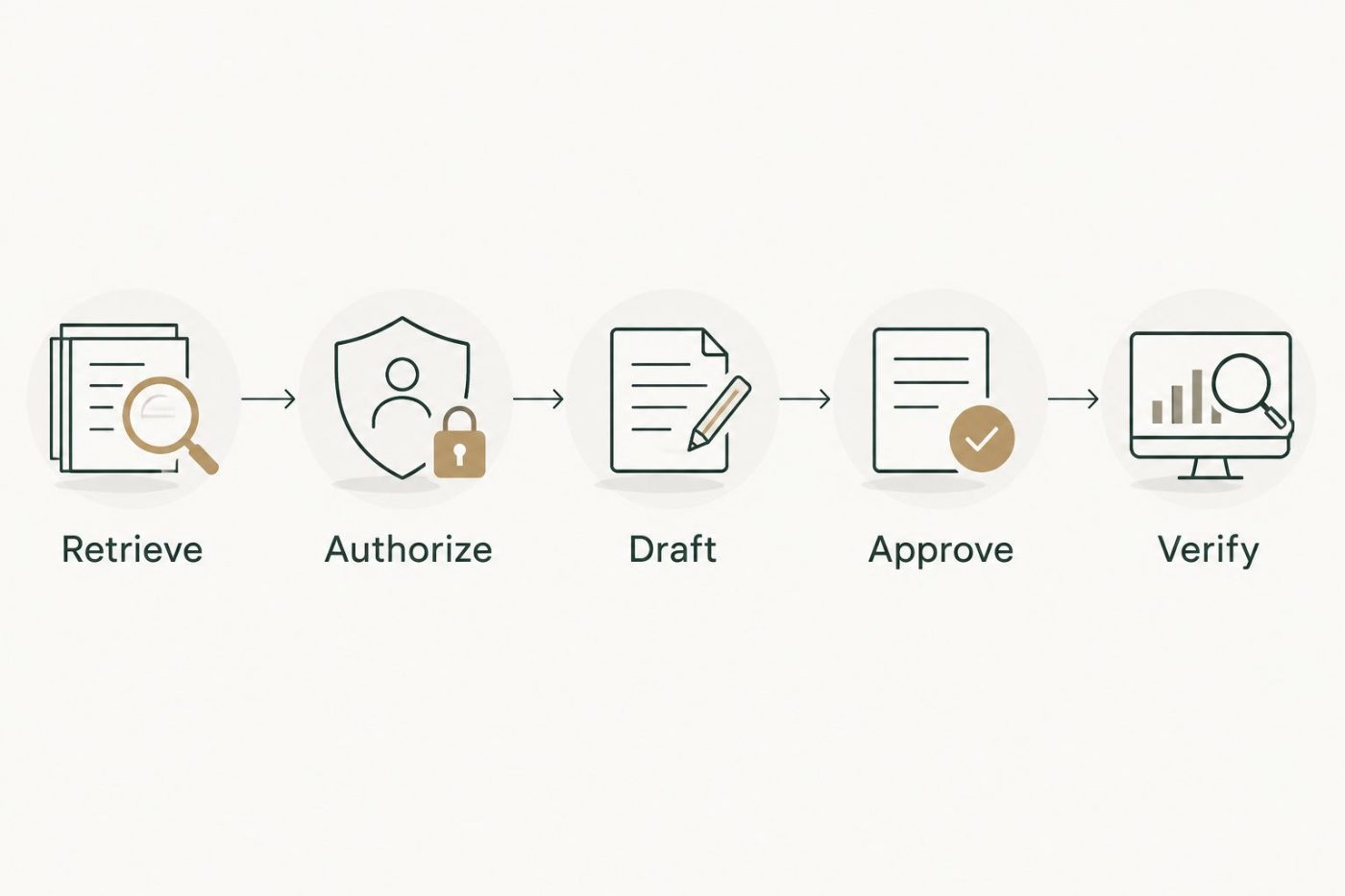
Approval is a separate control between a proposed change and a verified result.
4. Operations configuration
A support connection needs an operating model after deployment. Assign the responsibility for incorrect answers, failed requests, access changes, and interrupted service before users depend on it.
- Create the handoff rule. Route unsupported questions, denied lookups, uncertain answers, and failed actions to the established support process. Include the incident reference and a concise explanation of what failed, where disclosure is permitted.
- Define operational records. Capture the request identifier, operation, authorization outcome, approval outcome, and final status. Apply your retention and access requirements to these logs.
- Set release acceptance checks. Include an authorized lookup, a denied lookup, an ambiguous incident reference, an expired credential, an interrupted write, and malicious instructions inside ticket text.
- Name the service owner. Assign responsibility for credential maintenance, access reviews, knowledge changes, agent behavior, and escalation. Document how to pause actions while preserving the human support route.
- Train the support team. Explain what the agent can access, which actions require approval, and how staff report an incorrect answer. Train reviewers to inspect the underlying record, not merely accept fluent wording.
Expected result: Support staff can identify a failed interaction, explain who owns it, and continue service without relying on the agent.
Your 2026 operating review should examine actual exceptions and adoption alongside technical errors. A connection that staff bypass has not resolved the workflow bottleneck.
Second workflow: respond when an incident changes
Once the question-driven workflow is controlled, you can evaluate an event-driven variant: prepare an internal summary when an incident changes. This is useful when the bottleneck is repeated review rather than answering individual questions.
- Define the qualifying change. Choose a specific business event, such as a change in assignment, rather than triggering on every edit. Confirm the available trigger mechanism with your ServiceNow administrator.
- Send a minimal event. Pass the incident identifier and event context to the integration. Retrieve current information through the same authorized path instead of sending the entire record by default.
- Prevent repeat processing. Store a durable event identifier or another approved deduplication key. Check it before producing an action, particularly when delivery is retried.
- Prepare the handoff summary. Draft the relevant context for the receiving team. Keep any write-back behind the action controls already defined.
- Exclude self-generated changes. Ensure that the integration's own updates do not repeatedly trigger the same workflow.
Expected result: A qualifying incident change produces the intended draft or approved action without a repeating update cycle.
The trade-off is additional operational complexity. An event-driven workflow needs retry handling and duplicate prevention even when nobody is actively chatting with the agent.
Troubleshooting
Authentication fails or access is denied
Separate identity failure from permission failure. Check token validity and authentication configuration first; then inspect the integration identity's table, record, and field access. Do not resolve a denied request by granting broad administrative permissions.
The query returns no incident
Check the identifier, query syntax, table, and requester authorization. An empty response does not prove that the incident does not exist. Give the user a neutral response and offer an authorized human lookup instead of exposing whether a restricted record exists.
The agent describes the wrong status
Inspect the actual API response and the handling of choice and reference values. Confirm that the response formatter distinguishes stored values from display values. Do not let the model guess what an unfamiliar state value means.
A retry creates duplicate notes
Check whether the first write succeeded before repeating it. Use a durable action identifier and an execution record to distinguish a new approved action from a retry. Journal updates need particular care because repeating a write can add another entry.
An incident update triggers another update indefinitely
Review the event conditions and identify changes made by the integration itself. Exclude irrelevant changes and previously processed events. Pause write actions while correcting the trigger; keep the human escalation path available.
Customize your workflow
Expand only after identifying the next operational constraint. Adding approved knowledge retrieval, requester-facing answers, or more ticket actions creates different access and ownership requirements; none is simply a larger version of the original lookup.
Use the AI Opportunity Assessment to decide whether the bottleneck warrants implementation. National AI Consultants provides AI strategy, engineering, and fractional leadership, followed by implementation, ongoing management, and internal team training when justified.
For your 2026 roadmap, document the next decision—not a promised return. Specify the workflow owner, evidence required to proceed, and conditions that would stop expansion.
FAQ
How do I connect ServiceNow to an AI support agent?
Connect the agent through an authenticated integration that retrieves only authorized ServiceNow records. Start read-only, verify the actual runtime identity's access, and add ticket actions only after approval and audit controls work.
Do I need administrator access for the support agent?
Do not give the support agent administrator access as a shortcut. An administrator can configure the integration while the runtime uses an identity restricted to its approved operations.
Can an AI support agent update ServiceNow incidents?
An agent integration can update incidents when its permissions and configuration allow it. Restrict the allowed fields, verify requester authorization, require the defined approval, and confirm the resulting change.
Is a shared ServiceNow integration account enough to protect employee data?
A shared integration account alone does not establish an employee's right to see a record. The integration must verify the requester and enforce the required authorization before information reaches the model.
Should I trigger the agent whenever an incident changes?
Trigger only on changes that serve a defined support workflow. Broad triggers create unnecessary processing and require controls against duplicate events and updates caused by the integration itself.
What should happen when the agent cannot answer?
The agent should hand the interaction to the established support process without inventing an answer or changing the ticket. Provide the permitted incident context and explain the unresolved issue.
Does an AI Opportunity Assessment commit my business to implementation?
An AI Opportunity Assessment is the first engagement, not an automatic commitment to build. National AI Consultants proceeds toward implementation when the operational case justifies it.
One last thing
Test the interruption between approval and execution. If an incident changes after a reviewer approves the draft, the original approval can be stale. Recheck the record before writing, and require fresh approval when the relevant conditions have changed.