

How do you sunset legacy automation during AI transformation?
Sunset legacy automation AI transformation work without losing controls. Use clear retirement gates, accountable owners, rollback plans and adoption checks.

Sunset legacy automation during AI transformation by retiring a workflow only after its replacement passes business acceptance, preserves required controls, and has an approved recovery plan. Keep the existing automation available until the accountable process owner accepts the replacement in operation. Replacing a tool does not remove the reporting, exception handling, or downstream dependencies that the old workflow supported.
- Sunset legacy automation AI transformation decisions should depend on operational acceptance, not a software launch date.
- Retain effective rules-based automation when an AI replacement adds no defensible business value.
- Require named owners, exception handling, recovery procedures, and adoption evidence before retirement.
- National AI Consultants suits established businesses seeking assessment-led AI strategy, implementation, and ongoing management.
Why this matters
A legacy automation often carries more responsibility than its workflow diagram shows. Treat notifications, reconciliations, access permissions, and manual workarounds as dependencies to investigate before switching anything off.
For a 2026 transformation roadmap, distinguish between introducing a new capability and withdrawing an existing service. Those are separate decisions. A successful demonstration does not authorize retirement.
National AI Consultants starts with an AI Opportunity Assessment to determine where change is justified. An assessment does not commit your business to implementation; retaining a dependable automation is a valid decision.
How do you sunset legacy automation during AI transformation?
Use a controlled retirement process with explicit acceptance gates. Your operations leader should approve what changes, your technical owner should verify dependencies, and the person accountable for the business result should authorize the final shutdown.
1. Establish ownership
Name the business owner of the process, not just the administrator of the automation. Specify who approves changes, who handles exceptions, and who has authority to stop the transition.
Record what the automation does in operational terms: which event starts it, what decision it makes, what output it produces, and who depends on that output. Include manual corrections alongside automated steps. A workflow that appears self-contained can still depend on someone's spreadsheet or inbox.
Do not retire a workflow that nobody is prepared to own. Resolve that accountability gap before selecting a replacement.
2. Map dependencies
Trace the automation from its inputs through its final business outcome. Include systems that read its output later, not just systems directly connected to it.
Check scheduled jobs, service accounts, shared files, message queues, approval records, and reporting extracts. Ask process users what they do when the automation fails; those actions reveal requirements that technical documentation often omits.
Create a dependency record that identifies the owner and disposition of each connection. Every dependency needs a decision: preserve it, replace it, or remove it with approval.
3. Define acceptance
Agree on what the replacement must demonstrate before the existing automation becomes eligible for retirement. Write criteria in business language: correct routing, complete records, approved handling of sensitive information, and a usable exception process.
Do not use an aggregate accuracy score as the sole acceptance criterion. Separate ordinary cases from consequential errors, and define which decisions require human approval.
For a 2026 acceptance plan, record the workflow version and configuration under evaluation. Approval of one configuration should not automatically approve a materially changed replacement.
4. Validate operation
Evaluate the replacement against representative work, including exceptions and incomplete inputs. Where appropriate, compare its outputs with the existing workflow without allowing both systems to execute the same business action.
For example, a replacement can propose a routing decision while the existing automation remains responsible for actual routing. Define which system has authority before the comparison starts.
Record discrepancies and decide what they mean. The old automation is not automatically correct, and a different result is not automatically an improvement. Have the process owner resolve the difference against the agreed business requirement.
5. Approve retirement
Obtain operational acceptance, confirm user readiness, and approve the recovery procedure before removing the existing automation from service. Specify the condition that pauses the transition and the person authorized to invoke recovery.
After cutover, disable obsolete execution paths and review credentials, schedules, alerts, and integrations. Preserve records according to your applicable retention obligations rather than keeping every component running indefinitely.
Retirement is complete when the old workflow can no longer act unexpectedly and the new operating model has an accountable owner. Document that state, rather than treating a successful deployment as closure.
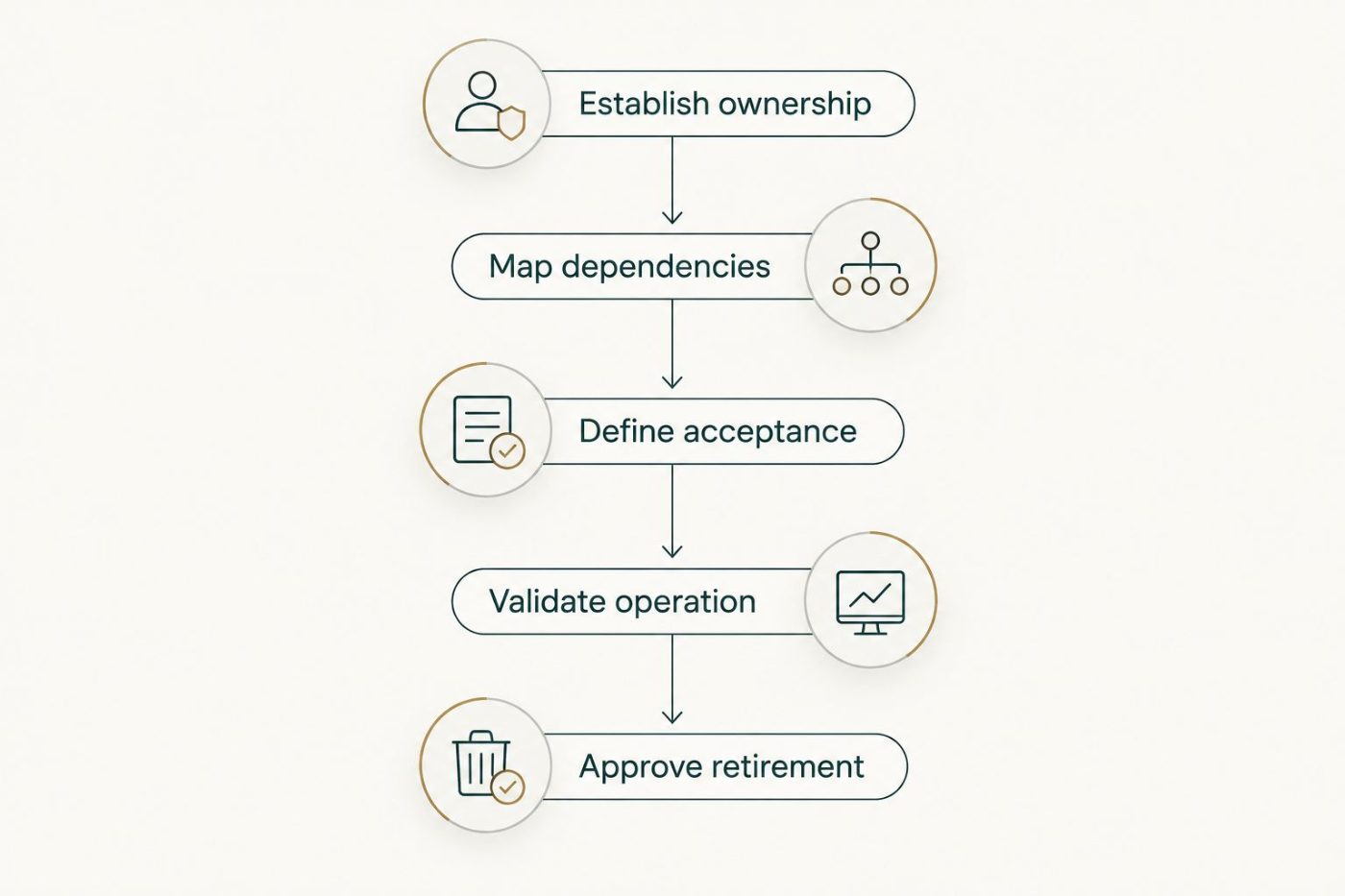
Approve retirement only after the replacement meets the agreed operating requirements.
Should you retain, modify, or replace the automation?
Choose the disposition before choosing the technology. A transformation program does not require every existing workflow to become an AI workflow.
| Option | Best for | Main advantage | Main constraint | Decision rule |
|---|---|---|---|---|
| Retain | Stable processes with clear rules and accepted results | Preserves a working process without introducing replacement risk | Leaves existing limitations unresolved | Keep it when the business requirement is already met |
| Modify | Workflows with a specific, bounded weakness | Addresses the weakness while preserving useful controls | Requires clear responsibility between old and new components | Change only the part that needs improvement |
| Replace | Workflows whose requirements the existing automation cannot meet | Allows the operating model to address the unmet requirement | Requires validation, transition planning, and ongoing ownership | Proceed only when the replacement passes agreed acceptance gates |
Retain: preserve what works
Keep rules-based automation when the rules remain appropriate, the output meets requirements, and the business can maintain it. Document the decision so retention is not mistaken for an overlooked task.
The limitation is straightforward: retention does not resolve a known operational gap. If users still perform substantial corrections, investigate the cause rather than labeling the process satisfactory because it runs without technical errors.
Modify: isolate the weak point
Use a bounded change when one part of the workflow needs different handling. Preserve deterministic checks where those checks express a clear business rule.
Define the handoff between the existing automation and the new component. Without that boundary, users can end up reconciling conflicting outputs manually, leaving the original bottleneck intact.
Replace: justify the additional responsibility
Replace the workflow when the existing approach cannot meet an approved business requirement and the proposed replacement can demonstrate that it does. Include implementation, supervision, exception handling, and maintenance in the decision.
The trade-off is greater transition responsibility. A broader replacement needs a correspondingly explicit acceptance and recovery plan; a new interface does not remove that work.
Why retirement complexity varies
Base a 2026 retirement sequence on operational exposure, not on which automation looks oldest. Review these factors before deciding which workflow to retire first:
- Business consequence: Identify what happens if the workflow stops, acts twice, or makes an incorrect decision. Tie the response to the consequence.
- Dependency reach: Determine which teams, reports, and systems consume its output. Each affected owner needs a documented transition decision.
- Exception burden: Document unusual cases and who resolves them. A replacement must support the exception path, not just the ordinary path.
- Control requirements: Identify approvals, access restrictions, audit records, and retention obligations that must survive the change.
- Recovery feasibility: Establish whether you can restore service without duplicating actions or losing changes made during the transition.
- User readiness: Verify that employees know where work goes, how to challenge an output, and how to obtain help.
Use these factors to order the work. A limited workflow with a clear owner and reversible actions provides a more controlled starting point than an undocumented process with consequential external effects.
What should the recovery plan contain?
A recovery plan must explain how you restore the business process, not merely how you restart the old software. If the replacement has already changed records or triggered actions, restarting the previous automation can create another problem.
Specify the failure conditions that trigger intervention. Assign authority to pause processing, identify the authoritative record, and describe how pending work is held or reassigned.
Then address reconciliation. Determine which completed actions must remain intact, which records require review, and how the team prevents duplicate execution after recovery.
Test the recovery procedure before authorizing retirement. Require the people responsible for operations to confirm that they can execute it with the access and information available to them.
For your 2026 operating procedures, keep recovery instructions with the workflow's ownership and acceptance records. A plan that users cannot find during an incident is not an operational safeguard.
How do you know employees are ready for the switch?
Employees are ready when they can complete the revised process, recognize an exception, and use the escalation path without relying on the retired workflow. Attendance at training is not the same as demonstrated readiness.
Ask users to work through ordinary tasks and difficult cases. Check whether they understand which decisions remain theirs and which outputs require review.
Remove ambiguity around parallel tools. If employees continue using the old automation after formal cutover, investigate whether the new process lacks a required function, a clear instruction, or trusted results. Do not solve an unresolved operating problem by removing access alone.
Who owns the replacement after retirement?
The business process owner remains accountable for the outcome, while a named technical owner manages the replacement's operation. Record the division of responsibility for monitoring, changes, access, exceptions, and incident response.
Review performance against the accepted business requirement rather than checking only whether the system is online. A workflow can run successfully while sending work to the wrong destination or leaving employees to repair incomplete outputs.
National AI Consultants provides strategy, engineering, fractional leadership, ongoing management, and internal-team training. That model fits established businesses seeking an ongoing AI department, not just a strategy document. The decision to engage still requires clear scope and responsibilities; an outside partner does not remove the need for an internal business owner.
FAQ
Do we need to replace every legacy automation during AI transformation?
No. Retain an existing automation when it meets the business requirement and remains maintainable. Replace or modify it only to address a defined operational need.
Can we run the old automation and the AI replacement together?
You can compare their outputs, but define which system is authorized to execute business actions. Prevent both systems from sending messages, changing records, or triggering the same transaction.
What should we check before turning off an old workflow?
Confirm business acceptance, dependency decisions, user readiness, and a tested recovery procedure. Also review schedules, credentials, alerts, and integrations so the retired workflow cannot continue acting unexpectedly.
Who should sign off on retiring legacy automation?
The accountable business process owner should authorize retirement, supported by technical and control owners. A deployment approval alone does not establish that the operating process is ready.
Does an AI Opportunity Assessment commit us to implementation?
No. National AI Consultants positions the AI Opportunity Assessment as the first engagement, with implementation following when justified. Keeping or modifying existing automation remains a valid outcome.
What belongs in a 2026 legacy automation retirement checklist?
A 2026 retirement checklist should cover ownership, dependencies, acceptance evidence, exception handling, recovery, user readiness, and final shutdown controls. Record who approves each decision and who owns the replacement afterward.
One last thing
Before approving shutdown, ask: What still depends on the old workflow that the replacement does not own? Require a written answer from the process owner and the technical owner.
The answer determines whether you are retiring an automation or abandoning a responsibility. Keep that distinction visible in the final approval: every required function must have an owner, even when its original software is gone.