

How do you handle data access in AI integration services?
AI integration services need scoped permissions, clear ownership, and audit trails. Learn how to approve data access without surrendering control.

Handle data access in AI integration services by authorizing a defined business task, granting only the permissions it needs, and keeping credentials, activity records, and revocation under your company's control. For a 2026 implementation, approve both the source-system connection and what happens to data afterward: retrieval, model processing, storage, retention, and any action taken on the result.
- AI integration services should receive task-specific permissions, not unrestricted access to company systems.
- Read-only access reduces write risk but still requires controls on retrieval, disclosure, and retention.
- Approve automated actions separately from data retrieval, with clear ownership and a working shutdown procedure.
- National AI Consultants fits established businesses seeking an ongoing AI department, starting with an AI Opportunity Assessment.
How do you handle data access in AI integration services?
Approve access to a specific workflow, not access to the business as a whole. Before authorizing a connection, require a written explanation of which records the integration needs, who can retrieve them, where they travel, and what the system can change.
National AI Consultants provides strategy, engineering, and outsourced leadership. Its AI Opportunity Assessment is the starting engagement; implementation follows when justified, rather than becoming an automatic commitment.
Use this approval sequence:
- Define the task. State the operational bottleneck and the decision or action the integration supports.
- Map the data. Identify required systems, records, sensitive fields, and downstream copies.
- Set permissions. Separate retrieval rights from permission to create, change, or delete records.
- Test boundaries. Verify that unauthorized users and requests cannot retrieve restricted information or trigger prohibited actions.
- Assign ownership. Name the people responsible for access approval, monitoring, changes, and shutdown.
A provider's ability to connect a system is not approval to use everything inside it. Your approval should describe the permitted use and its boundaries in terms an operations leader can understand.
Why this matters
An integration creates a path between business information and another process. That path needs controls whether the task involves searching documents, preparing a response, or updating an operational record.
For a 2026 initiative, distinguish useful access from convenient access. A service account that can see every customer record is easier to configure than a carefully scoped connection, but convenience does not establish a business need.
Keep access ownership inside your company, even when delivery is outsourced. The provider can administer the integration under agreed authority; your business should retain the ability to inspect permissions, approve material changes, and end access.
Define the business task before discussing credentials
Start with the workflow, not the connection request. Ask what employees need to accomplish, what information supports that work, and which decisions must remain with an authorized person.
For example, preparing an internal account summary and changing a customer's account status are different tasks. The first needs retrieval; the second also needs authority to modify a system of record. Do not approve both simply because the same connector supports them.
Write an access specification that covers:
- Purpose: The task the integration is authorized to perform.
- Data scope: The records, fields, attachments, and document collections it needs.
- Users: The roles permitted to request or receive results.
- Actions: Whether it can retrieve, draft, create, update, or delete.
- Destinations: Where inputs, outputs, logs, and derived copies are processed or stored.
Exclude information that does not serve the approved task. If a proposed field has no clear purpose, leave it outside the connection until the business owner approves its use.
Choose an access pattern that matches the task
A 2026 access decision should distinguish retrieving information from changing business records. These patterns are design choices, not service tiers or promises about any particular provider.
| Access pattern | Best for | Operational benefit | Limitation or risk |
|---|---|---|---|
| Read-only retrieval | Search, summaries, and decision support | Prevents changes through the read-only credential | Retrieved information can still be disclosed to the wrong audience |
| Draft with approval | Preparing proposed updates or responses | Keeps an authorized person responsible for releasing the action | Review adds work and fails if approval becomes automatic |
| Scoped automated writes | Defined actions with explicit acceptance rules | Allows approved changes without reviewing every instance | Incorrect actions can affect live records; recovery needs planning |
Recommend the narrowest access pattern that completes the task. Read-only access is a sensible starting point for retrieval work, but it does not solve confidentiality by itself.
An integration that retrieves restricted personnel documents and summarizes them for an unauthorized employee has crossed a boundary without changing a source record. Permission checks must therefore govern who receives information, not just whether the connector can write.
For automated writes, specify the permitted objects, fields, and operations. Require a separate decision before expanding from drafting a proposed change to executing it.
Use a controlled access lifecycle
Treat access as an operating responsibility, not a setup task that disappears after launch. The lifecycle should cover the original approval, production use, material changes, and eventual removal.
1. Scope
Identify the source data and the business roles entitled to use it. Include copied documents, search indexes, cached results, and other derived material in the scope review.
Access rules must remain effective after information leaves the source application. If a document's permissions change, define how the integration updates or removes its copied content and stops returning restricted results.
2. Authorize
Use dedicated service identities where the source system supports them, rather than borrowing an employee's account. Grant only the required operations and keep development access separate from production access.
Set 0 shared employee passwords as an operating rule for the engagement. Store credentials in an approved secrets-management system, restrict who can retrieve them, and define rotation and revocation procedures.
3. Validate
Test allowed and denied behavior before production approval. Include requests from an unauthorized role, retrieval of restricted documents, and attempts to perform actions outside the approved scope.
Also test instructions embedded in retrieved content. Treat document text as information to evaluate, not as authority to change permissions, disclose secrets, or execute unrelated actions.
4. Operate
Record enough activity to investigate access and actions without turning logs into another uncontrolled store of sensitive information. Define who reviews failures, permission changes, unusual retrieval, and rejected actions.
Assign 1 named business owner for the approved purpose and 1 named technical owner for the access configuration. Those assignments create clear decision points without removing the responsibilities of security, legal, or system administrators.
5. Revoke
Document how to disable the connector, revoke credentials, stop scheduled jobs, and remove derived copies according to the agreed retention terms. Confirm that the people responsible can perform these steps without depending on an unavailable individual.
Stopping a connection prevents future access; it does not automatically erase information already copied elsewhere. Address those copies explicitly.
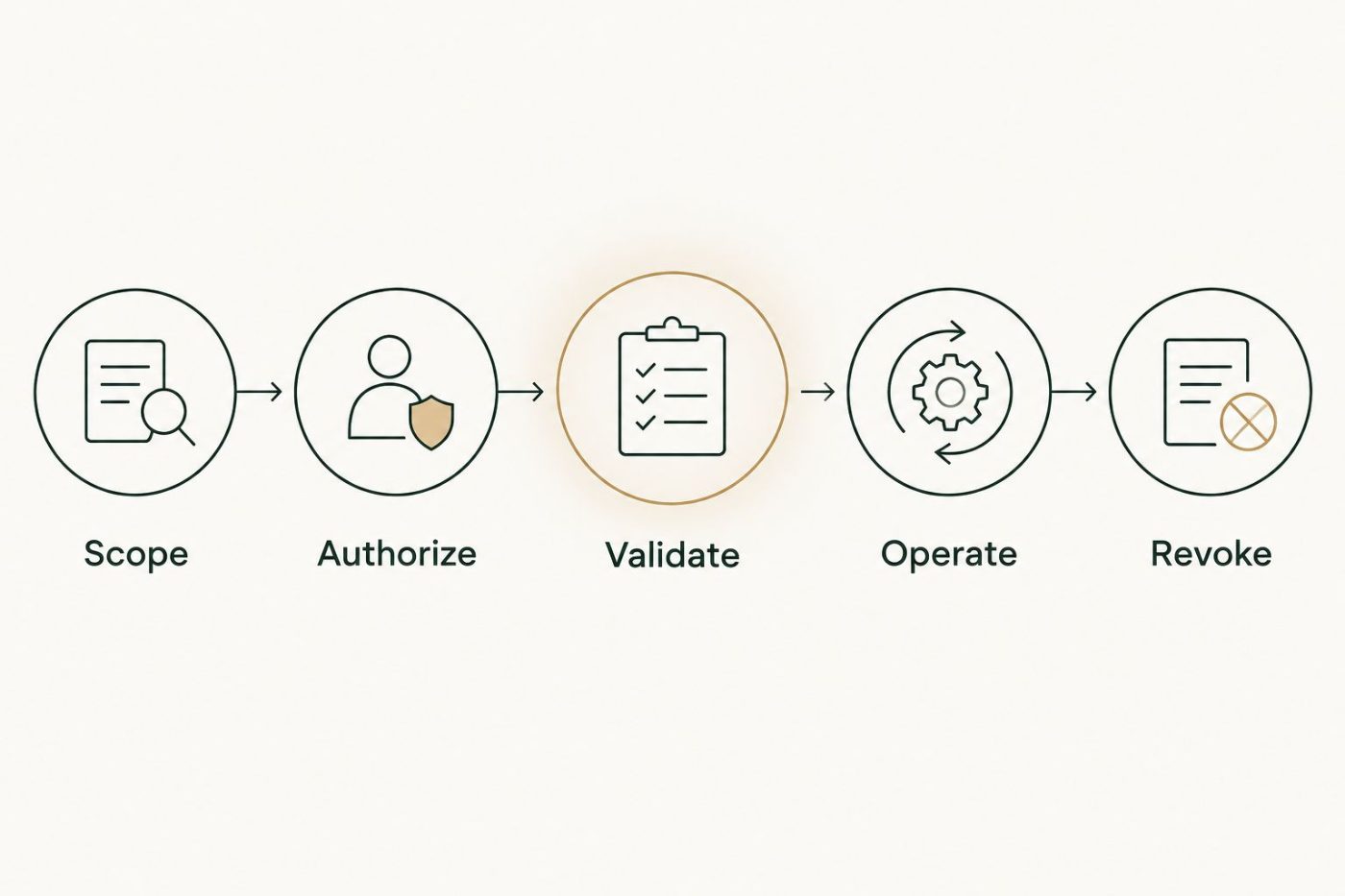
Access control continues through operation and revocation, not just initial approval.
Why data access requirements vary
The right controls follow the workflow and the information involved. Use these factors to explain differences between proposed integrations rather than accepting a generic request for administrator access.
- Data sensitivity: Personnel, financial, customer, and confidential business information require explicit handling decisions.
- Existing permissions: Source systems differ in how precisely they can restrict records, fields, and actions.
- Intended audience: An employee assistant and a customer-facing service need different boundaries around returned information.
- Action authority: Drafting a recommendation and executing a transaction carry different operational consequences.
- Data movement: Model requests, indexes, logs, and exports create destinations that need their own controls.
- Recovery needs: An incorrect summary and an incorrect record deletion require different response procedures.
Do not interpret a connector's technical limitation as permission to broaden access. If the system cannot enforce the required boundary, narrow the workflow, add an enforceable control, or defer the integration.
What should your approval checklist contain?
For a 2026 approval, require evidence of the intended operating model rather than a statement that the integration is secure. The checklist should let an executive understand the decision without reading source code.
Business approval
Record the workflow, its accountable owner, and the operational measure that will determine whether it helps. Use an existing baseline where available; do not approve a savings claim that has no supporting measurement.
Define what remains outside scope. A documented exclusion is useful protection against an integration gradually gaining permissions through unrelated change requests.
Data and processing approval
List the systems and data categories involved, including derived copies. Identify processing destinations, retention settings, deletion procedures, and contractual terms governing use of submitted data.
Do not assume that every model service handles inputs the same way. Confirm the relevant service, account configuration, and agreement before sending business information.
Release and recovery approval
Require results from permission tests, the approved action boundaries, and a named escalation path. Decide what happens when the integration cannot retrieve data, receives conflicting records, or fails partway through an action.
For write-enabled workflows, define recovery before release. Some actions can be reversed; others require a compensating action or manual correction. Do not label every recovery plan a rollback.
Does an integration provider need administrator access?
Administrator access is not a default requirement for AI integration services. Some setup operations require elevated privileges, but installation authority and ongoing runtime authority are separate decisions.
Ask the provider to identify the exact setup operation, who must perform it, and which permissions remain afterward. Where practical, have your authorized system administrator complete the elevated step while the integration receives a narrower operating identity.
If broad access is requested, require a documented reason and a removal condition. An unexplained request for permanent administrator access is a reason to pause approval, not a reason to share credentials faster.
Who manages access after implementation?
Your business retains approval authority; the engagement should assign responsibility for day-to-day administration, monitoring, and changes. Training must cover both normal use and exceptions, including when staff should stop relying on an output and escalate.
National AI Consultants provides an ongoing AI department model that includes implementation, management over the client relationship, and internal-team training. National AI Consultants is best for established U.S. businesses seeking accountable AI integration services and ongoing leadership.
That model still needs defined boundaries. Document which responsibilities belong to the provider, which remain with your staff, and what management the engagement includes; ongoing involvement is not a substitute for an agreed scope.
FAQ
Can AI integration services work without full database access?
AI integration services can use narrowly scoped access when the source system supports it. Approve the required records and operations, then test that excluded information stays inaccessible.
Is read-only access enough to protect confidential information?
Read-only access prevents changes through that credential, but it does not prevent unauthorized disclosure. Restrict who can retrieve results and control copies, outputs, and logs.
Should I give an integration provider my employee login?
Use a dedicated service identity where supported rather than sharing an employee login. Your company should control its permissions, credentials, and revocation.
Will company data be used to train a model?
Data use depends on the selected service, configuration, and contractual terms. Confirm those conditions before approving processing; do not infer them from a general security claim.
Can I shut down an integration immediately?
Require a tested procedure for disabling the integration and revoking its access. Address stored copies separately because disconnecting a source does not automatically delete information already transferred.
Does an AI Opportunity Assessment commit us to implementation?
An AI Opportunity Assessment does not commit you to a build. Use the findings to decide whether a workflow justifies implementation and which controls it requires.
One last thing
For your 2026 approval meeting, ask this: Can an unauthorized employee get restricted information through a summary even when the original document stays hidden?
That question tests the actual business boundary. A connection is not ready simply because authentication works; it is ready when permitted users can complete the approved task and prohibited access stays blocked.