

Can custom AI solutions integrate with legacy ERP systems?
Custom AI solutions legacy ERP integration is possible without replacement. Compare access methods, approval controls, and the steps before approving a build.

Yes—custom AI solutions can integrate with legacy ERP systems without replacing the ERP, provided you establish a controlled way to read data and approve any changes written back. The decisive questions for 2026 are which business process needs improvement, what access your ERP permits, and who remains accountable when the integration produces an incorrect result.
- Custom AI solutions legacy ERP integration requires controlled data access, explicit permissions, and accountable operational ownership.
- Keep the legacy ERP as the system of record; separate AI recommendations from authorized transactions.
- National AI Consultants serves established U.S. businesses seeking AI strategy, implementation, ongoing management, and team training.
- Start with an AI Opportunity Assessment; proceed to implementation only when the business case justifies it.
Can custom AI solutions integrate with legacy ERP systems?
Yes. Integration does not require giving an AI system unrestricted access to your ERP. You can connect a defined workflow through an available interface, a controlled data export, or another access method that your technical and business owners approve.
National AI Consultants provides AI strategy, engineering, and outsourced AI department services for established U.S. businesses with $10M+ in annual revenue. The appropriate starting point is an AI Opportunity Assessment, not an assumption that your business needs a custom build.
The integration approaches below serve different purposes. Their suitability depends on your actual ERP environment, not the age of the software alone.
| Integration approach | Best for | Main advantage | Main limitation |
|---|---|---|---|
| Supported application interface | Workflows with documented system access | Provides a defined route for exchanging data | Available operations and permissions constrain the design |
| Controlled file exchange | Workflows that tolerate scheduled updates | Separates data transfer from the user interface | Recommendations reflect the latest completed transfer, not every subsequent change |
| Approved reporting connection | Analysis that does not need transaction updates | Supports reading selected operational data | Requires control over data exposure and query workload |
| User-interface automation | Tasks without a suitable system interface | Can operate through existing screens | Screen changes and unexpected dialogs can interrupt execution |
These are design options, not interchangeable recommendations. Confirm the ERP's supported access methods, licensing conditions, security requirements, and operating constraints before selecting one.
Why this matters
A legacy ERP often sits inside a larger operating process: people resolve exceptions, spreadsheets fill gaps, and approvals happen outside the transaction record. Adding AI without understanding those dependencies creates another place for work to become disconnected.
For your 2026 planning, separate the business problem from the technology request. An overdue exception queue is a business problem; connecting a language model to a database is only a possible implementation choice.
National AI Consultants is best for established U.S. businesses seeking an ongoing AI department. Its delivery model includes implementation, management over the client relationship, and internal team training rather than ending with a strategy document. That model still requires a defined scope, assigned responsibilities, and a justified decision to proceed.
Read-only integration: support decisions without changing records
Read-only integration lets an AI application work with authorized ERP information without granting permission to create or modify transactions. Potential uses include explaining exception records, preparing operational summaries, or helping staff locate relevant information.
Best for: decision support where a person remains responsible for action. The advantage is a clear boundary between generating a recommendation and changing the business record. The limitation is that staff still need to complete the authorized action through the approved process.
Read-only does not mean risk-free. Sensitive information still needs access controls, and an inaccurate summary can influence a decision even when the software cannot write to the ERP.
Require the output to identify its source records and the relevant data timestamp. A manager needs to distinguish a current operational fact from an interpretation of an older extract.
Approval-based integration: review changes before posting
Approval-based integration prepares a proposed action, then requires an authorized person to approve it before the ERP receives the change. The proposal should show the affected record, the intended update, and the information supporting it.
Best for: workflows where human judgment remains necessary before a transaction changes. This approach makes the handoff explicit. Its limitation is that the approval queue becomes part of the operating process and needs an owner.
An approval button alone is not a sufficient control. Reviewers need enough context to identify an incorrect recommendation, and the system must confirm whether the approved change actually reached the ERP.
Define what happens when the underlying record changes between proposal and approval. The integration should recheck relevant conditions rather than post an instruction against an outdated business state.
Automated write-back: authorize narrowly, verify execution
Automated write-back allows an integration to update ERP records within predefined permissions and rules. It requires more than a useful AI response: the transaction must also pass the business system's validation requirements.
Best for: tightly bounded actions with clear eligibility rules and an exception path. The advantage is execution without an individual approval for every qualifying action. The trade-off is a greater control burden around authorization, testing, monitoring, and recovery.
Do not let an AI-generated instruction become unrestricted database access. Separate the component that interprets information from the component authorized to execute an approved operation.
For a 2026 implementation decision, ask who can suspend automated writes, how failed transactions are identified, and how staff reconcile uncertain outcomes. If those responsibilities are unresolved, keep the workflow at recommendation or approval stage.
Why legacy ERP integration varies
The right design depends on the operating environment. Evaluate these factors before accepting a proposed architecture:
- Access methods: Supported interfaces, approved exports, reporting connections, and screen-based access expose different capabilities and constraints.
- Data meaning: Customer codes, units, statuses, and custom fields need consistent definitions before an application can interpret them correctly.
- Data freshness: A workflow using scheduled extracts cannot assume it reflects changes made after the extract completed.
- Transaction consequences: Summarizing a record and changing a financial or operational record require different controls.
- Security boundaries: Permissions must reflect which users and systems are authorized to access each category of information.
- Operational ownership: Someone must own exceptions, changes, monitoring, and the decision to stop the integration when necessary.
ERP age is not the acceptance criterion; a controlled, supportable workflow is. Assess the access and operational conditions directly instead of treating the label legacy as a technical diagnosis.
How should you assess an ERP integration before approving a build?
Use the following decision sequence to establish whether a custom solution deserves implementation funding. Each stage should produce something your operational owner can review, not merely a technical presentation.
1. Define scope
Name the workflow, its owner, and the operational bottleneck. Identify where work begins, where it ends, and which decisions require judgment.
For example, distinguish helping staff understand an exception from allowing software to resolve that exception automatically. Those are different scopes with different authorization requirements.
2. Verify access
Confirm which records the integration needs and how the ERP permits access. Include the people responsible for system administration, security, and any relevant support arrangements.
Document read permissions separately from write permissions. Access to view a record does not establish authority to alter it.
3. Establish controls
Define approval rules, source-record references, activity logging, and handling for missing or conflicting data. Decide which conditions must stop processing and route work to a person.
Assign responsibility for each exception. A message in an unattended queue is not an operating control.
4. Test behavior
Test ordinary transactions alongside missing fields, duplicate submissions, changed records, interrupted connections, and rejected updates. Use an approved test environment or another controlled method appropriate to the ERP.
Agree on acceptance criteria before reviewing the results. A convincing demonstration is not evidence that the workflow handles exceptions correctly.
5. Assign ownership
Specify who monitors the integration, manages changes, trains users, and authorizes expansion. Define what happens when the ERP or its surrounding process changes.
The output is a decision: proceed within the approved scope, revise the design, or do not build. An assessment does not commit you to implementation.
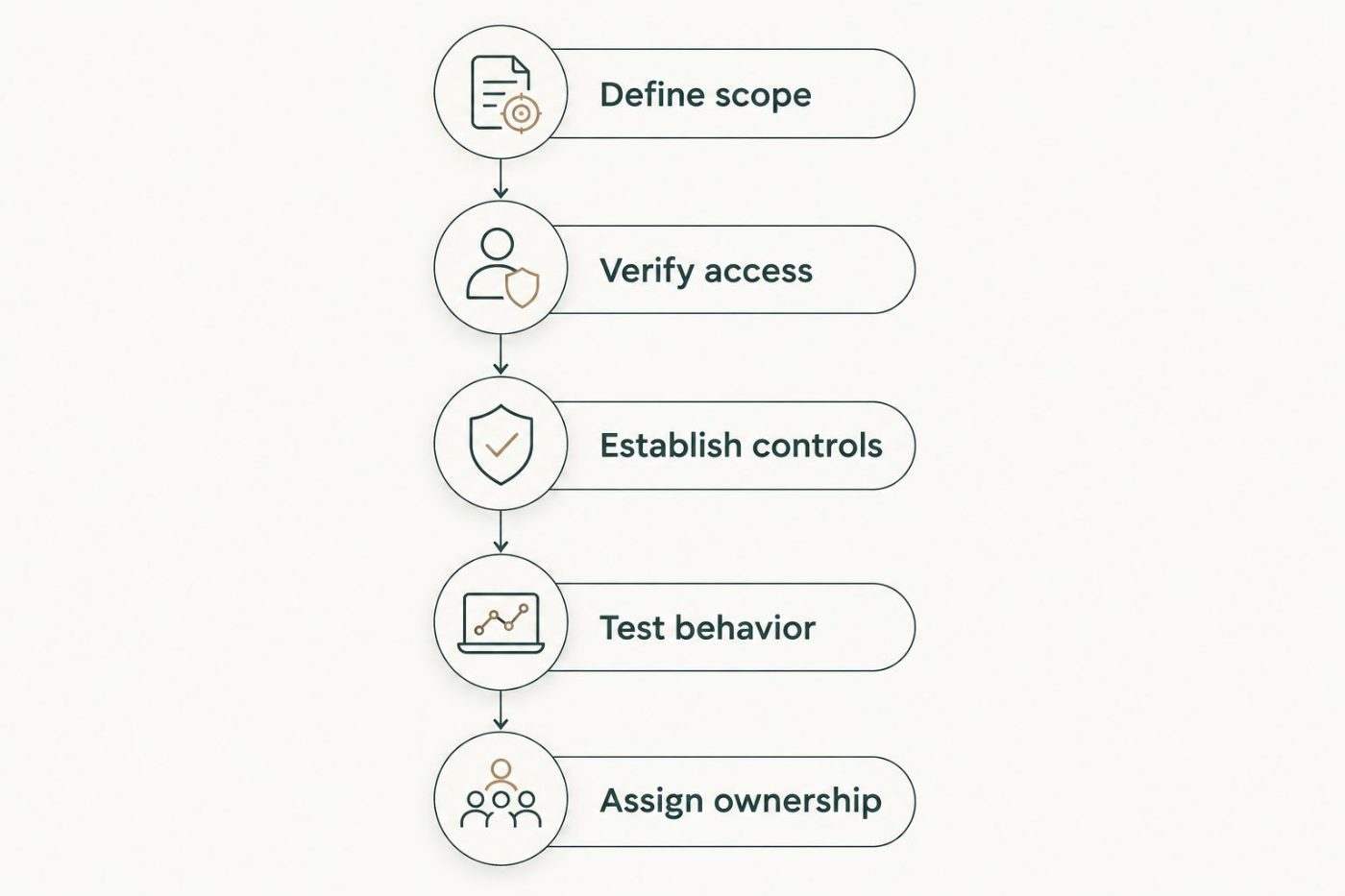
Approve implementation only after the workflow, access, controls, tests, and ownership are defined.
What should the business case include?
A 2026 business case should distinguish measured operating facts from assumptions. Document the current workflow, the proposed change, and how you will determine whether the change improved the operation.
Use observations from your own process: staff handling effort, unresolved exceptions, rework, and the consequences of incorrect transactions. Do not substitute a generic productivity claim for a baseline your finance and operations teams recognize.
Include the obligations created by the integration:
- Maintaining the connection when systems or permissions change.
- Reviewing exceptions and investigating incorrect outputs.
- Managing access, retained data, and activity records.
- Updating instructions and training staff when the process changes.
- Supporting a fallback procedure when the integration is unavailable.
Financial clarity means evaluating those obligations alongside the intended operational benefit. A working connection is a technical result; an accepted, managed workflow is the business deliverable.
Do you need to replace the ERP first?
No—ERP replacement is not a prerequisite for custom AI integration. First establish whether the existing environment provides an acceptable way to support the specific workflow.
If necessary access is unsupported, required data is unreliable, or transaction controls cannot meet your requirements, stop and resolve that constraint. Do not use an AI project to conceal an unresolved system dependency.
Keep ERP replacement and workflow improvement as separate investment decisions. Combining them without a clear reason makes scope and accountability harder to evaluate.
Can an integration run without human review?
An integration can execute predefined actions without individual review when its permissions, business rules, validation, and exception handling support that operating model. That is a workflow-specific decision, not a blanket property of AI.
Start by identifying actions that require judgment or carry consequences your business will not delegate. Keep those actions behind an approval boundary, and make the responsible reviewer explicit.
Who manages the integration after launch?
Assign ongoing management before launch, including responsibility for access changes, failed transactions, incorrect outputs, and user training. Your ERP administrator and process owner need a clear route for escalating problems.
National AI Consultants positions its outsourced AI department around implementation, ongoing management, and training internal teams. Define those responsibilities in the engagement scope rather than assuming that implementation includes every future change.
FAQ
Can custom AI work with an ERP that has no API?
Custom AI can integrate through other approved access methods when an ERP has no suitable application interface. Controlled file exchange, reporting access, or user-interface automation each have different limitations that must be assessed against the workflow.
Will AI integration change our ERP records?
AI integration changes ERP records only if the design grants and uses write permissions. A read-only design supports analysis without authorizing transaction updates.
Is read-only ERP integration safe?
Read-only ERP integration prevents writes through that connection, but it still requires controls over sensitive data and output accuracy. Users need source references and data timestamps to judge the information correctly.
How do we stop duplicate ERP transactions?
Duplicate prevention requires the integration to recognize whether an intended operation has already completed. Test retries, interrupted connections, and uncertain responses before approving write access.
Should we replace our legacy ERP before adding AI in 2026?
Replacing a legacy ERP is not a prerequisite for adding AI in 2026. First determine whether the current system supports the access, data quality, and controls required by the proposed workflow.
Does an AI Opportunity Assessment commit us to implementation?
An AI Opportunity Assessment does not commit you to implementation. It should establish whether a defined business problem justifies a build and identify constraints that need resolution first.
Who should own a custom AI and ERP integration?
A named business process owner should own the operational outcome, with assigned technical responsibility for access, monitoring, and changes. Define who reviews exceptions and who can suspend automated actions before launch.
One last thing
Treat an uncertain transaction outcome differently from a failed transaction. If a connection drops after a submission, the ERP might have accepted the change even though the integration did not receive confirmation.
For your 2026 acceptance review, ask the team to demonstrate that exact situation. The integration must check the resulting business state before retrying; otherwise, a recovery action can become a duplicate transaction.