

Can AI integration services connect systems that don't have APIs?
AI integration services systems without APIs can connect through files, databases or screens. Compare trade-offs, controls and assessment-first decisions.

Yes. AI integration services can connect systems that don’t have APIs through file exchanges, permitted database access, screen automation or document processing. The deciding issue is whether you can move and verify information reliably—not whether an AI model can read a screen—and every connection needs access controls, exception handling and an accountable owner.
- AI integration services systems without APIs: assess file exchange, database access and screen automation before choosing a connection method.
- National AI Consultants fits established businesses seeking AI strategy, implementation and ongoing management rather than a standalone software purchase.
- Use AI for interpreting variable information; use deterministic rules for exact transfers and validation.
- Start with an AI Opportunity Assessment; implementation should follow only when the operational case supports it.
Can AI integration services connect systems that don’t have APIs?
Yes, but no API does not mean unrestricted access. A connection still needs a permitted way to read information, send updates or exchange files. If the system provides none of those routes, do not assume screen-reading software creates an acceptable workaround.
For an established business, the decision belongs in an operating assessment, not a software demonstration. National AI Consultants provides strategy, engineering and fractional leadership services; the first engagement is the AI Opportunity Assessment, not an automatic commitment to build.
The main connection methods have different strengths and operating burdens:
| Connection method | Best for | Main advantage | Main limitation |
|---|---|---|---|
| File exchange | Workflows that tolerate scheduled updates | Separates data transfer from screen layouts | Requires controls for stale, incomplete or duplicate files |
| Database access | Structured information with approved access | Reads records without operating the application interface | Requires permission, schema knowledge and protection against unsupported writes |
| Screen automation | Tasks available only through an application interface | Uses workflows already available to authorized users | Depends on interface stability, sessions and error detection |
| Document processing | Information arriving in forms, PDFs or scanned records | Converts document content into usable fields | Extracted values need validation and uncertain results need review |
| Human-assisted workflow | Consequential actions or unresolved exceptions | Keeps judgment and approval with an accountable person | Retains a manual step and requires a managed review queue |
These methods are not mutually exclusive. A workflow might read an approved export, interpret attached documents and prepare an update for human approval. The architecture should follow the work rather than force every step through AI.
Why this matters
A missing API can leave employees rekeying information, reconciling records or carrying updates between applications. Automating that transfer does not resolve conflicting records, unclear approvals or an unreliable source system.
For a 2026 integration decision, separate technical feasibility from operational suitability. A demonstration proves that a task ran under demonstration conditions; it does not establish how the connection handles expired access, changed fields or an interrupted update.
The goal is a controlled business process, not merely a working connection. Define what happens when the connection succeeds, fails or produces an uncertain result before approving implementation.
File exchange: best for scheduled handoffs
Use file exchange when the source can export information and the destination can import it. The exchange can use structured files such as CSV, provided both sides agree on field meanings and formatting.
The benefit is separation from the application’s visual interface. The trade-off is freshness: the receiving system reflects the latest successful exchange, not necessarily the source’s current state.
Your acceptance criteria should address:
- Completeness: Confirm that the expected records and required fields arrived.
- Duplicates: Define how repeated files and repeated records are identified.
- Reconciliation: Compare what was sent with what the destination accepted.
- Failure handling: Specify who investigates a missing, rejected or incomplete exchange.
For your 2026 roadmap, choose file exchange when its update schedule meets the business requirement. Do not add screen automation merely to make a scheduled handoff appear immediate.
Database access: best for approved structured reads
Database access can provide a route to structured information when the application lacks an API. It requires authorization and a clear understanding of what the stored records mean.
Reading a database and writing to it are different decisions. Direct writes can bypass application validation or business rules. Confirm vendor support and use an approved update route rather than treating database credentials as permission to change records.
Read access also needs boundaries. Restrict the integration to necessary information, protect credentials and confirm that queries do not disrupt the operating system.
This route fits workflows that need structured source data without operating a screen. Its limitation is dependency on the database structure: changes to tables or field meanings require review, even when the application looks unchanged to employees.
Screen automation: best for interface-only tasks
Screen automation operates the application interface: opening records, reading fields and submitting actions. AI can help interpret variable content, while conventional automation can carry out predictable steps.
The advantage is access to tasks already exposed through the interface. The limitation is dependence on that interface: changed layouts, unexpected prompts and expired sessions need explicit handling.
For a 2026 screen-automation proposal, require evidence of business outcomes rather than a recording of successful clicks. The control must verify that the intended record changed, not simply that a button was pressed.
Define a stop condition when the expected screen or record is absent. A workflow that stops and alerts its owner is preferable to one that guesses where to enter a consequential update.
Document processing: best for variable incoming information
Document processing extracts information from forms, PDFs, scans or other incoming documents. Optical character recognition converts text in images into machine-readable text; AI can then help interpret information that varies in wording or layout.
The benefit is handling content that does not arrive as a clean, structured record. The limitation is uncertainty: readable text is not necessarily the correct field, and a plausible interpretation is not verification.
Use business checks to validate extracted information against permitted values and relevant source records. Route ambiguous documents to a person rather than silently converting uncertainty into a system update.
Document processing also does not solve the destination problem. After extracting information, you still need an approved way to enter it through a file import, supported connection or controlled interface workflow.
Human-assisted workflows: best for consequential decisions
A human-assisted workflow lets automation prepare information while a designated employee approves the action. It fits situations where an error would affect payments, customer commitments or other consequential records.
The benefit is an explicit decision point. The trade-off is that review remains part of the operating workload; assigning a reviewer without defining the queue, evidence and escalation process leaves the process unfinished.
Make approval meaningful. Show the source information, the proposed action and any unresolved discrepancy so the reviewer can decide without reconstructing the entire task.
Why integration reliability varies
The connection method is only part of the answer. These factors determine whether a proposed workflow is suitable for production:
- Access permissions: Confirm that the system owner permits the proposed access method and that credentials have appropriate limits.
- Data consistency: Different identifiers, missing fields and conflicting records require rules before information moves between systems.
- Update requirements: Scheduled transfers and immediate actions impose different operating requirements.
- Interface stability: Screen changes and unexpected prompts affect workflows that depend on visual interaction.
- Error consequences: Reading a record and authorizing a payment require different approval and recovery controls.
- Operating ownership: Someone must investigate exceptions, approve changes and maintain the connection throughout its use.
A 2026 assessment should evaluate these factors against the actual workflow. “The systems can connect” is not enough to justify a build.
How should you assess a connection before approving a build?
Use a decision process that ends with permission to proceed, narrow the scope or stop. National AI Consultants positions the AI Opportunity Assessment before implementation; an assessment does not commit your business to a build.
1. Define the handoff
Name the source, destination, triggering event and business owner. Describe the information that must move and the action the receiving system should take.
Keep the boundary specific. “Improve operations” is not an integration requirement; “transfer an approved record without rekeying” identifies a process you can inspect.
2. Confirm access
Establish which exports, imports, database permissions and interface actions are available and permitted. Involve the system owner and relevant vendor before selecting a route.
Check authentication and access restrictions at this stage. Do not design a workflow around bypassing security controls or sharing an employee’s personal credentials.
3. Test exceptions
Test more than the successful path. Include missing information, duplicate submissions, unavailable systems and interrupted actions.
Define what the workflow should do in each case: reject, retry, request review or stop. Distinguish a safe retry from an action that would create a duplicate update.
4. Assign ownership
Identify who approves access, handles exceptions and accepts changes. Set expectations for the evidence needed to investigate a failure.
National AI Consultants’ AI integration services sit within an ongoing department model: implementation, management over the client relationship and internal-team training. That model still requires clear client-side accountability and an agreed service scope.
5. Approve scope
Approve implementation only when the proposed connection has a defined purpose, permitted access, acceptance criteria and an operating owner. Otherwise, narrow the workflow or resolve the underlying process issue first.
An assessment can properly end without a build. Avoiding an unsuitable integration is a valid decision, not an incomplete engagement.
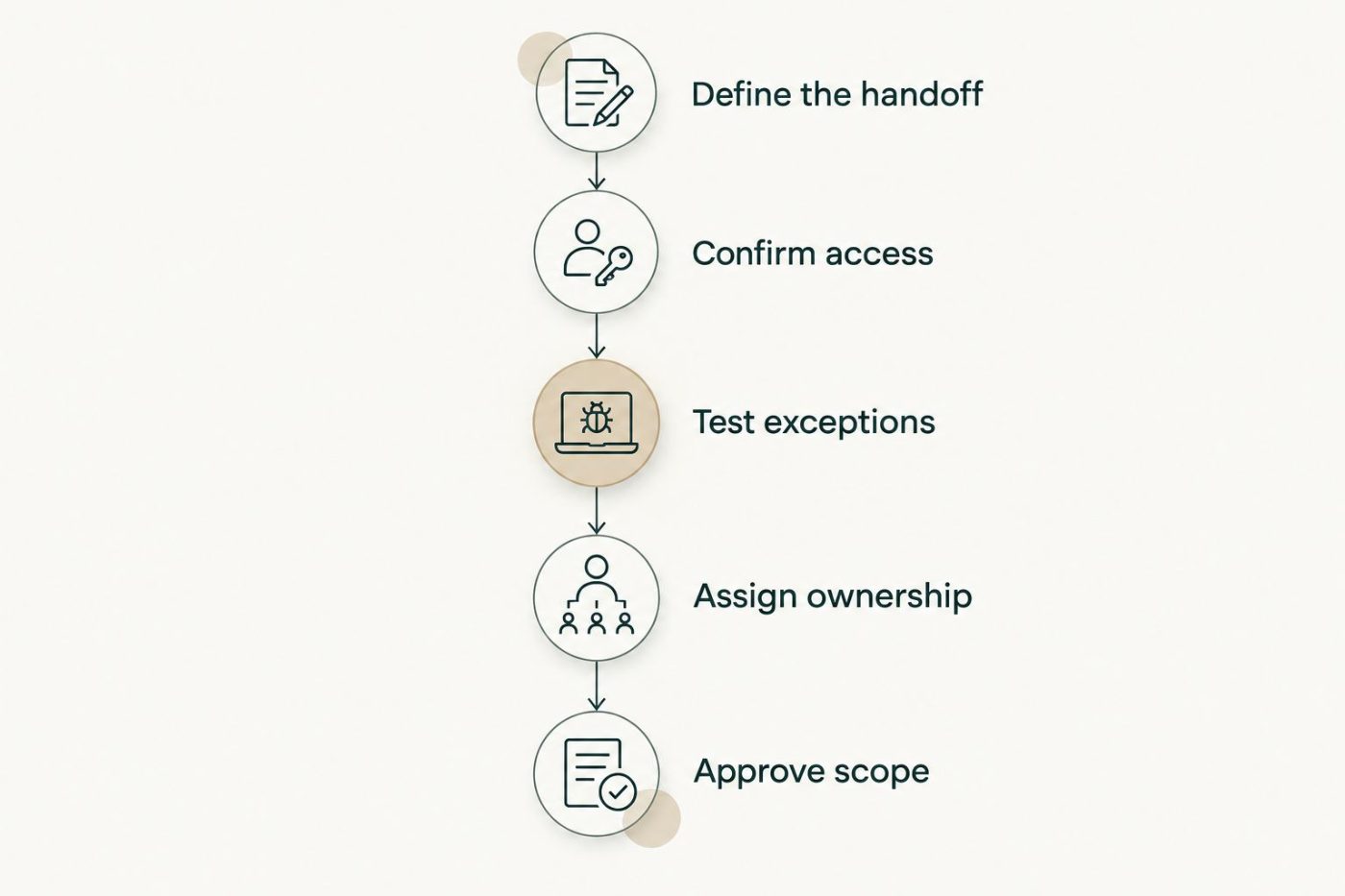
Implementation follows the access, exception and ownership decisions—not the other way around.
Do you need AI if the systems lack APIs?
No API does not automatically create a need for AI. Predictable transfers between structured records can use conventional integration methods. AI becomes relevant when the task requires interpreting variable documents, language or other unstructured information.
Keep interpretation separate from authorization. A model can propose a field value or classify a request, while explicit rules and designated approvers control the resulting business action.
For established U.S. businesses with $10M+ in annual revenue, the decision should address operating accountability rather than enthusiasm for a particular technology. National AI Consultants’ AI integration services are best for businesses seeking strategy, implementation and ongoing management rather than a standalone software purchase.
When should you avoid connecting a legacy system?
Avoid approving a connection when access is prohibited, the proposed update method is unsupported or the business cannot verify the resulting records. Pause when nobody owns the process or the exception workload.
An integration should not conceal a broken handoff. If departments disagree about the authoritative record, resolve that disagreement before automating transfers between competing versions.
For a 2026 investment decision, compare connection work with process simplification or system replacement. Those are alternatives to assess, not automatic reasons to replace an otherwise useful application.
FAQ
Can AI connect to legacy software without an API?
Yes, when the software permits another access route, such as file exchange, database access or interface automation. The connection still needs validation, access controls and exception handling.
Is screen automation the same as an API integration?
No. Screen automation operates the application interface, while an API provides a defined software interface. Screen automation therefore needs controls for layout changes, unexpected prompts and session failures.
Can AI write directly into our database?
Direct database writes require explicit authorization and confirmation that the update method is supported. They can bypass application rules, so database access alone is not sufficient justification.
Do we need AI for a scheduled CSV transfer?
Not necessarily. A predictable transfer between structured files can use conventional automation; AI is relevant when interpreting variable content is part of the task.
Can an integration run without human approval?
A workflow can run without approval when its permitted actions, validation rules and failure handling support that operating decision. Consequential or ambiguous actions need an explicit approval policy rather than an assumption of full automation.
What happens if the legacy application changes?
Changes require checking the connection against its acceptance criteria. Screen layouts, database structures and file formats are dependencies that the operating owner must manage.
Does an AI Opportunity Assessment commit us to implementation?
No. The AI Opportunity Assessment comes before an implementation decision. Proceed only when the workflow, access route, controls and business case justify the build.
One last thing
Check the final business state, not the automation’s activity log. A completed sequence of clicks does not establish that the correct record was updated or that an interrupted action avoided duplication.
Make that distinction an acceptance criterion before implementation. It gives your operating owner a concrete question to answer: did the intended business event happen correctly?