

Automatically flag churn risk when support sentiment drops
Automate churn risk detection support sentiment workflows with human review. Set account matching, evidence rules, ownership, and release controls.

Instead of manually reading support threads to spot unhappy customers, connect support events to an account-level review workflow that flags declining sentiment, assigns an owner, and records the response. To automate churn risk detection, support sentiment should trigger investigation—not an automatic conclusion that a customer will leave.
- To automate churn risk detection, support sentiment needs account context, accountable ownership, and human review.
- National AI Consultants fits established businesses seeking an accountable AI department, not another standalone sentiment tool.
- Flag a change in sentiment against the same customer's history, rather than treating every complaint as churn.
- Start with an AI Opportunity Assessment; approve implementation only when the operational case supports it.
Why this matters
A frustrated support message tells you that something needs attention. It does not establish cancellation intent, explain the underlying problem, or identify who should respond. A negative exchange can concern a single incident while the wider customer relationship remains intact.
The useful output is an owned review task with supporting evidence, not a sentiment score without an explanation. Your workflow should connect the customer's language, unresolved issues, and account context before it asks someone to act.
For your 2026 operating plan, define the response process before selecting a classifier. National AI Consultants provides AI strategy, engineering, fractional leadership, implementation, ongoing management, and internal team training. The first engagement is an AI Opportunity Assessment, not a commitment to build this workflow.
Before you start
- Access and ownership: Identify administrators for your support platform, customer records, and workflow system. Name the business owner responsible for reviewing flags, plus the person authorized to approve data access.
- Evidence and permissions: Gather representative support conversations, their account identifiers, and known outcomes where available. Confirm which messages, attachments, and customer details the workflow is permitted to process.
- The account-matching gotcha: A support requester is not always the account owner. Shared inboxes, consultants, and customers with multiple accounts can create incorrect matches. Resolve ambiguous identities before generating account-level risk flags.
Do not begin with full access to every conversation. Start with an approved scope and a clear explanation of which records enter the workflow. Exclude material your team cannot lawfully or contractually send to the selected processing environment.
For a 2026 rollout, document the approved systems and permissions alongside the workflow. Access approval belongs in the operating record, not just in an administrator's memory.
1. Support event configuration
The setup below specifies the workflow's behavior without assuming a particular software vendor. Bold terms are proposed configuration labels for your implementation specification, not claims about existing menu names or buttons.
- Set Source event to a customer-authored message being added to an eligible support conversation. Include reopened conversations if those belong within the approved scope.
- Define Eligible conversations using the support channels and account population your owner has approved. Exclude internal notes from customer-language analysis.
- Set Account identifier to the stable identifier shared by your support and customer records. Do not rely on a display name as the matching key.
- Define Event key using an identifier that distinguishes the triggering message. Store it before processing so repeated delivery does not create repeated work.
- Configure Unmatched account to create an identity-resolution task rather than a churn-risk task. Keep the message reference available for the reviewer.
Expected result: An eligible customer message enters the workflow once and attaches to the correct account. An uncertain match stops before account-level classification.
Test both a normal message and a repeated delivery of that same message. The second delivery should not generate another review task. This check verifies duplicate handling; it does not prove sentiment accuracy.
2. Sentiment and evidence configuration
Sentiment classification means assigning a description of the customer's expressed tone. Churn-risk review is a separate decision about whether that evidence warrants account-owner attention.
- Define Customer text to separate the new customer message from agent replies, signatures, and quoted history. Retain enough approved context to interpret what the customer is responding to.
- Set Sentiment output to a structured result containing the tone label, a supporting excerpt, and an explanation. Require an uncertain result when the available text does not support a clear interpretation.
- Define Comparison baseline using earlier eligible messages from the same account. Keep the method consistent and document how missing history is handled.
- Configure Risk evidence to distinguish expressed frustration from explicit cancellation language, a repeated unresolved issue, or a request to escalate. Preserve the original wording for review.
- Set Insufficient evidence to route uncertain cases for review or leave them unclassified, according to the approved process. Never silently substitute neutral sentiment for missing evidence.
Expected result: A reviewer can see what changed, which customer words support the classification, and what remains uncertain.
Do not invent a universal numerical threshold. Choose decision rules from representative conversations and compare the proposed classifications with human judgments. For a 2026 evaluation, retain the configuration version so later changes can be traced to their results.
A message such as a brief acknowledgment needs its surrounding conversation. Conversely, explicit cancellation language should not disappear because other messages in the thread sound polite. Keep tone and stated intent as separate evidence fields.
3. Risk review and routing configuration
Use a small, explicit state model before adding more elaborate scoring. The following 3 review states describe workflow handling, not measured probabilities of churn.
| Review state | Best for | Advantage | Limitation |
|---|---|---|---|
| No new flag | Messages without qualifying new evidence | Keeps the review queue focused | Does not establish that the account is healthy |
| Human review | Declining tone, uncertain meaning, or unresolved account context | Adds judgment before intervention | Requires reviewer capacity and consistent decisions |
| Priority review | Explicit cancellation language or another approved escalation condition | Makes the stated concern visible to an accountable owner | Still does not prove that cancellation will occur |
- Define Review condition using documented combinations of sentiment change and account evidence. Keep the condition readable enough for the operational owner to explain.
- Set Assigned owner from the account's ownership record. Name a fallback queue for accounts without an active owner.
- Configure Review task to include the account, source conversation, evidence excerpt, classification explanation, and requested decision. Include only approved customer information.
- Set Existing open review to update the current account review when appropriate instead of opening a new task for every message.
- Define Reviewer outcome so the owner can confirm concern, dismiss the flag with a reason, or request more information. Record the decision separately from the original classification.
Expected result: Every actionable flag has 1 accountable owner, accessible evidence, and a recorded disposition. A notification without an owner fails this acceptance check.
The operating sequence is Capture evidence, Compare context, Assign review, and Record outcome. Keep those responsibilities visible even if one system performs several steps.
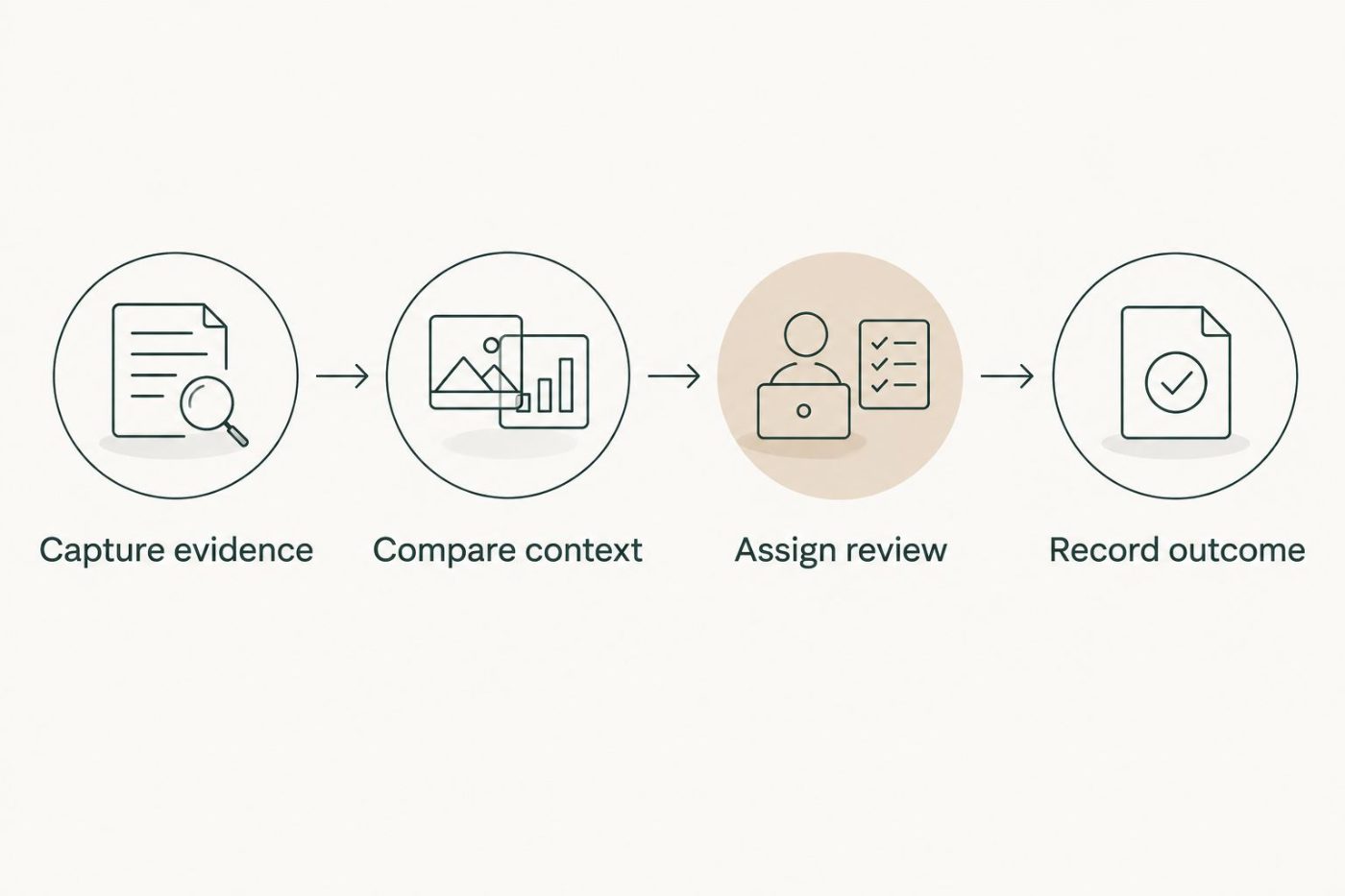
A flag becomes operationally useful when someone owns the review and records a decision.
4. Validation and release controls
A workflow that runs successfully can still route the wrong accounts. Validate interpretation, identity matching, and ownership before allowing live customer-facing consequences.
- Assemble Evaluation cases covering ordinary complaints, unresolved problems, explicit cancellation language, short replies, and ambiguous account matches. Use approved records with reviewer decisions.
- Set Test mode to record proposed flags without changing customer records or contacting customers. Compare the results with the reviewers' decisions.
- Inspect Missed concerns and Unnecessary flags separately. A single combined accuracy figure can conceal the kind of error that matters operationally.
- Define Release approval with the business owner and responsible technical administrator. Document who can change classification instructions, routing rules, and access permissions.
- Configure Failure handling so processing errors remain visible and recoverable. Reprocessing must preserve duplicate protection and the original event reference.
Expected result: The approved workflow identifies its evidence, routes exceptions, and exposes failures without sending unapproved customer messages.
Your 2026 release checklist should also name the person who can pause processing. Write down what happens to incoming events during a pause and how the team reconciles them afterward.
Keep automated customer outreach outside the initial workflow. First establish whether reviewers receive useful, correctly matched evidence. Outreach introduces a separate approval decision about wording, timing, and customer treatment.
Variant: Reassess risk when a support case changes
A message-triggered workflow captures new language. A case-update workflow captures changes such as reopening or a revised resolution status. These are adjacent workflows, not interchangeable signals.
| Workflow | Best for | Advantage | Limitation |
|---|---|---|---|
| New customer message | Changes in expressed tone or stated intent | Supplies direct customer-language evidence | Misses operational changes without a new message |
| Support case update | Reopened cases and changes to unresolved status | Adds service-process context | A status change alone does not establish sentiment |
For the update variant, change Source event to the approved case update and retain the same account matching, ownership, and duplicate controls. Retrieve the latest eligible customer evidence rather than assigning a new sentiment label to a status field.
Maintain 2 evidence records when both workflows apply: the customer-language finding and the case-state finding. Connect both to the same account review, while preserving their different meanings.
Expected result: A reopened case updates the existing review with service context. It does not automatically prove that customer sentiment has declined.
Troubleshooting
Every complaint creates a risk flag
The review condition is treating negative tone as sufficient evidence. Separate sentiment classification from escalation rules, then inspect dismissed flags to identify which conditions need revision. Preserve explicit cancellation language as its own signal.
The wrong customer account receives the flag
Account matching is relying on incomplete or ambiguous identifiers. Stop account-level writes for those records and route them to identity resolution. Correct the match before reprocessing; changing the sentiment instructions will not repair an identity problem.
The owner receives repeated alerts
Repeated event delivery or multiple messages are creating separate tasks. Check the event key and the existing-open-review rule. Update the active review with new evidence rather than issuing another standalone alert for the same unresolved concern.
Short or sarcastic messages produce inconsistent labels
The classifier lacks enough context or is being forced to choose a definite label. Include the relevant approved conversation context and allow an uncertain result. Send ambiguous cases to human review rather than treating the output as established intent.
Flags stop appearing without an obvious error
An empty queue does not distinguish quiet customer activity from a broken workflow. Check incoming event records, failed processing, permissions, and owner-routing exceptions. Make failure visibility part of ongoing management, not a check performed only at launch.
Customize your workflow
Expand only after the support-to-review handoff works. Additional account context should answer a specific business question, have an approved source, and change an identifiable review decision.
- Adoption: Train account owners to confirm or reject a flag using evidence, not simply acknowledge an alert.
- Governance: Record who approved changes and retain the relationship between each result and its configuration version.
- Financial clarity: Compare implementation and operating requirements with the business problem before authorizing more scope. Do not count every flagged account as retained revenue.
National AI Consultants positions ongoing AI department services around implementation, management, and internal team training. That delivery model requires clear responsibilities across the client relationship; it is not a promise of unconditional support.
For your 2026 roadmap, begin with the AI Opportunity Assessment. The next decision is whether this workflow warrants implementation, a narrower test, or no build—not which software to purchase by default.
FAQ
Can I automate churn risk detection using support sentiment alone?
You can automate sentiment flagging, but sentiment alone does not establish churn risk. Combine customer-language evidence with account context and an accountable human review.
What should trigger a support sentiment workflow?
An eligible customer-authored message is a useful trigger for analyzing expressed tone. Case updates can run a separate workflow that adds service context without inventing a new sentiment finding.
What's the best threshold for flagging a customer?
Use a threshold or decision rule evaluated against representative conversations and human judgments. There is no universal numerical threshold that this guide can substantiate for your accounts.
Should the workflow automatically email an unhappy customer?
Keep automated outreach outside the initial release. First validate account matching, evidence quality, and reviewer decisions, then approve customer communication as a separate workflow.
How do I prevent duplicate churn-risk alerts?
Store a distinct event key and check for an existing open account review before creating a task. New evidence should update the active review when it concerns the same unresolved issue.
What if a customer has no previous support history?
Mark the comparison baseline as unavailable rather than claiming that sentiment has declined. Review the current message on its own evidence, including any explicit cancellation language.
Does an AI Opportunity Assessment commit us to implementation?
No. National AI Consultants starts with an AI Opportunity Assessment so implementation is considered only when justified by the operational case.
One last thing
A resolved ticket is not the same as a recovered customer relationship. Keep the support case status separate from the account owner's review outcome. Otherwise, closing a case can erase the very concern the workflow was built to surface.